
程序员量化交易实战 42:每日运行 artifact 落盘
程序员量化交易实战 42:每日运行 artifact 落盘
古董级程序员,大厂出来后一直在创业公司,现在仍活跃在一线做 AI 相关的开发。这个专栏会把一个 A 股量化平台从 0 到 1 拆开写:数据、策略、回测、模拟盘、提醒和生产化,尽量用真实代码和真实运行结果说话。更完整的更新也会同步到微信公众号「字与码」。
第 41 篇把每日运行计划压成了一行摘要,适合日志和命令行。
但日志只能回答“当时看起来是什么状态”。如果要排查一次运行为什么 blocked,还需要更完整的证据:输入股票、失败检查、失败动作、生成时间。这就是 artifact 的作用。
artifact 存什么
第 42 章新增 app/daily_run_artifacts.py。
@dataclass(frozen=True)
class DailyRunArtifact:
    path: Path
    payload: dict[str, Any]
payload 不是把 dataclass 直接粗暴序列化,而是写成稳定的调试格式。
| 字段 | 说明 |
|---|---|
trade_date | 运行对应的交易日 |
status | ready、dry_run_ready 或 blocked |
required_symbols | 本次运行请求的股票列表 |
failed_checks | 未通过的检查项 |
actions | 每个失败检查对应的处理动作 |
generated_at | 请求生成时间 |
executable | 是否允许真实执行 |
构造 JSON payload
核心函数是 daily_run_artifact_payload()。
def daily_run_artifact_payload(plan: DailyRunPlan) -> dict[str, Any]:
    summary = build_daily_run_summary(plan)
    return {
        "trade_date": summary.trade_date,
        "status": summary.status,
        "dry_run": summary.dry_run,
        "symbol_count": summary.symbol_count,
        "required_symbols": list(plan.request.required_symbols),
        "failed_checks": list(plan.result.failed_checks),
        "actions": [
            {
                "check_name": action.check_name,
                "action": action.action,
                "severity": action.severity,
            }
            for action in plan.failure_actions
        ],
        "action_summary": summary.action_summary,
        "executable": summary.executable,
        "generated_at": plan.request.generated_at.isoformat(),
    }
这里刻意把 tuple 转成 list。artifact 是给外部读取的,不应该暴露 Python 内部对象习惯。
写入文件
文件名按交易日生成:
def write_daily_run_artifact(plan: DailyRunPlan, *, directory: Path) -> DailyRunArtifact:
    payload = daily_run_artifact_payload(plan)
    directory.mkdir(parents=True, exist_ok=True)
    path = directory / f"daily-run-{payload['trade_date']}.json"
    path.write_text(json.dumps(payload, ensure_ascii=False, indent=2) + "\n", encoding="utf-8")
    return DailyRunArtifact(path=path, payload=payload)
blocked 场景下,artifact 会保留这样的动作信息:
{
  "actions": [
    {
      "check_name": "run_health",
      "action": "inspect_run_health",
      "severity": "blocker"
    }
  ]
}
这比只在日志里看到 blocked 有用得多。
接到可运行示例
第 42 篇继续使用同一个命令复现 artifact 落盘:
uv run python -m scripts.chapter_examples paper-command本章对应的输出如下:
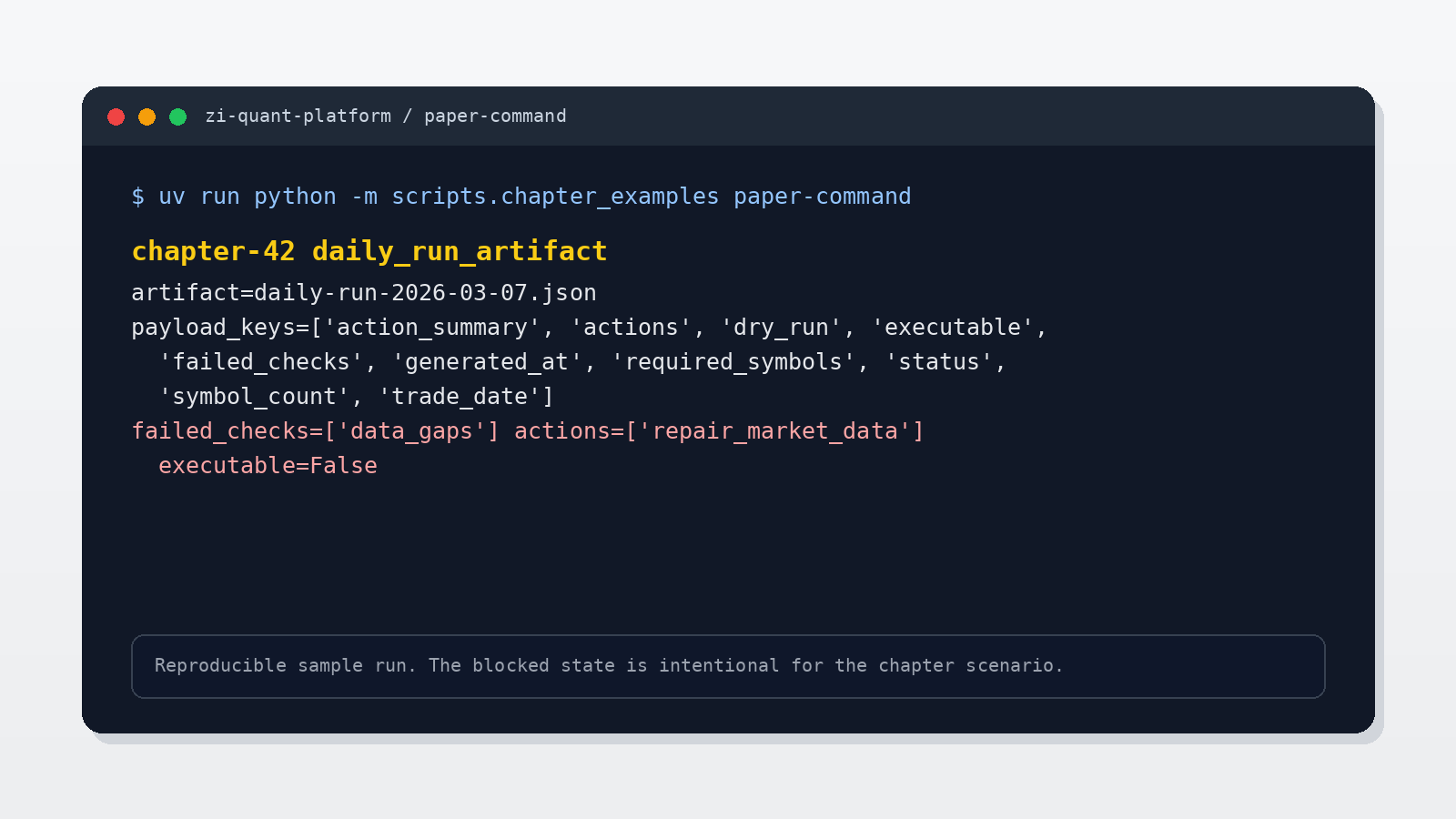
这张图里有三个排查时真正有用的点。
artifact=daily-run-2026-03-07.json 说明文件名稳定,按交易日定位。值班时不需要在日志目录里猜哪个文件是当天结果。
payload_keys 说明 artifact 里同时保留了请求、状态、失败检查、动作和生成时间。它不是一行摘要的备份,而是更完整的运行证据。
failed_checks=['data_gaps'] actions=['repair_market_data'] executable=False 把失败原因和处理方向放在一起。看到这行就知道不是策略信号问题,也不是运行窗口问题,而是行情数据缺口挡住了执行。
生产系统里我会把日志、artifact 和后续 runbook 分开看:日志用于第一眼判断,artifact 用于复盘证据,runbook 用于下一步动作。三者互相引用,但不要互相替代。
测试
本章测试覆盖:
- payload 是否包含调试所需上下文。
- 写入后的 JSON 是否能完整读回。
- blocked 场景下动作是否保留
check_name、action和severity。
运行命令:
uv run pytest tests/test_daily_run_artifacts.py tests/test_daily_run_summary.py tests/test_daily_run_plan.py本批次补充 paper-command 后,全量测试通过:
276 passed, 2 warnings本章更新与代码仓库
本章更新内容:
- 新增
app/daily_run_artifacts.py。 - 新增
DailyRunArtifact。 - 实现
daily_run_artifact_payload()。 - 实现
write_daily_run_artifact()和read_daily_run_artifact()。 - 新增
tests/test_daily_run_artifacts.py,覆盖 payload 与 JSON round trip。 - 在
scripts/chapter_examples.py中接入 artifact 写入与读回,文章截图来自该命令输出。
代码仓库:
https://github.com/ax2/zi-quant-platform本章代码:
git clone https://github.com/ax2/zi-quant-platform.git
cd zi-quant-platform
git checkout chapter-41-45-paper-command
uv sync --extra dev
uv run python -m scripts.chapter_examples paper-command
uv run pytest tests/test_daily_run_artifacts.py tests/test_daily_run_summary.py tests/test_daily_run_plan.py tests/test_chapter_examples.py
第 41-45 篇共用 tag chapter-41-45-paper-command。当前全量测试通过:276 passed,只有既有 FastAPI deprecation warning。
本篇小结
artifact 是生产系统里的证据文件。
第 42 篇把每日运行计划落成 JSON,让后续命令、告警和排查都能指向同一个文件,而不是各自拼一份上下文。