
我给 Codex 做了个额度体检
古董级程序员,大厂出来后一直在创业公司,现在仍在一线做 AI 相关开发。更完整的技术记录写在微信公众号「字与码」:AI 编程、工程实践、本地工具链和这些年踩过的坑,会不定期发在那里。若这篇对你有用,欢迎顺手关注。
Codex 用得多了以后,会遇到一个很现实的问题:我到底还有几次 reset credits?这些 reset 什么时候过期?当前 5 小时窗口和周窗口还剩多少?
界面上不一定总能看到完整信息,但本地 Codex 已经有登录态。只要你已经通过 codex login 登录过,~/.codex/auth.json 里会有当前会话可用的 token。这个 token 可以请求 ChatGPT 后端的一部分额度接口。
这篇文章记录一个我自己用的查询方法。重点不在“找到一个隐藏接口”,而在安全边界:token 只在本机脚本里用,输出里不要出现 token、cookie、refresh token、完整账号 ID,也不要把原始响应贴到聊天或文档里。
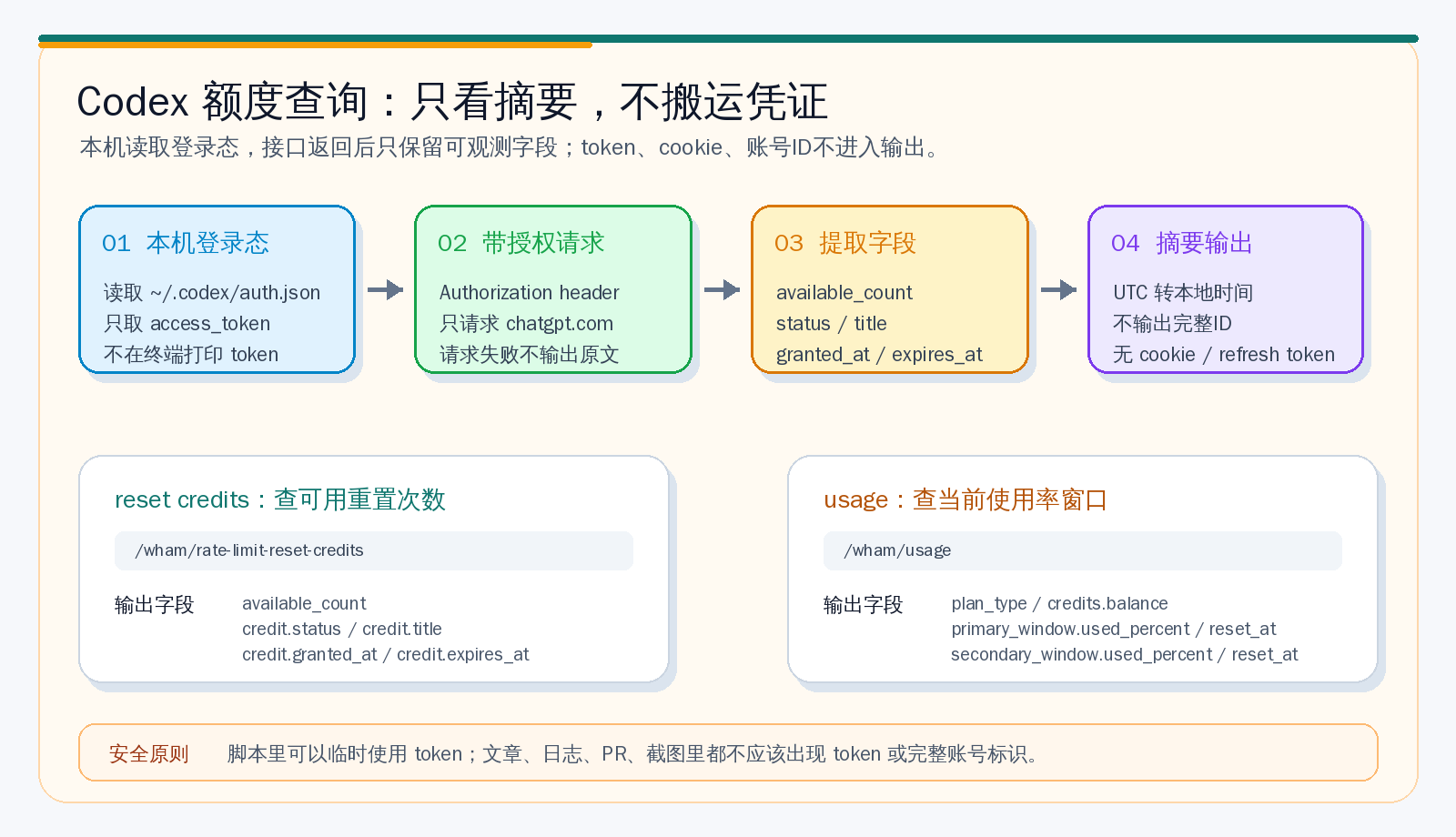
先看结果长什么样
我希望看到的输出只有这些:
HTTP 状态码: 200
available_count: 3
credits_count: 3

credit #1
  status: available
  title: Full reset (Weekly + 5 hr)
  granted_at: 2026-06-18 08:32:53 CST+0800
  expires_at: 2026-07-18 08:32:53 CST+0800
这里没有 access token,没有 refresh token,没有 cookie,也没有完整的唯一 ID。时间已经从 UTC 转成了本地时区。
如果返回 401,基本可以按两类问题排查:凭证失效,或者请求没有正确带上 Authorization: Bearer ...。
查询 reset credits
下面这个脚本会读取 ~/.codex/auth.json 里的 tokens.access_token,请求:
https://chatgpt.com/backend-api/wham/rate-limit-reset-credits它只输出 available_count,以及每个 credit 的 status/title/granted_at/expires_at。
import json
import subprocess
import sys
from datetime import datetime, timezone
from pathlib import Path

AUTH_PATH = Path.home() / ".codex" / "auth.json"
URL = "https://chatgpt.com/backend-api/wham/rate-limit-reset-credits"


def to_local(value):
    if not value:
        return None

    if isinstance(value, (int, float)):
        ts = value / 1000 if value > 10_000_000_000 else value
        dt = datetime.fromtimestamp(ts, timezone.utc)
    elif isinstance(value, str):
        text = value.strip()
        if not text:
            return None
        if text.endswith("Z"):
            text = text[:-1] + "+00:00"
        dt = datetime.fromisoformat(text)
        if dt.tzinfo is None:
            dt = dt.replace(tzinfo=timezone.utc)
    else:
        return value

    return dt.astimezone().strftime("%Y-%m-%d %H:%M:%S %Z%z")


try:
    token = (json.loads(AUTH_PATH.read_text()).get("tokens") or {}).get("access_token")
except Exception as exc:
    print(f"读取 auth.json 失败: {type(exc).__name__}: {exc}")
    sys.exit(1)

if not token:
    print("未找到 tokens.access_token")
    sys.exit(1)

proc = subprocess.run(
    [
        "curl",
        "-sS",
        "-L",
        "--max-time",
        "45",
        "-H",
        "Accept: application/json",
        "-H",
        f"Authorization: Bearer {token}",
        "-w",
        "\n__HTTP_STATUS__:%{http_code}\n",
        URL,
    ],
    stdout=subprocess.PIPE,
    stderr=subprocess.PIPE,
    text=True,
)

if proc.returncode != 0:
    print(f"网络请求失败: curl exit {proc.returncode}")
    sys.exit(1)

marker = "\n__HTTP_STATUS__:"
if marker not in proc.stdout:
    print("响应格式异常:未找到 HTTP 状态码")
    sys.exit(1)

body, status_text = proc.stdout.rsplit(marker, 1)
status = int(status_text.strip() or "0")

if status == 401:
    print("HTTP 401: 凭证失效,或请求没有正确携带 Authorization header")
    sys.exit(0)

if status < 200 or status >= 300:
    print(f"HTTP {status}: 请求失败")
    sys.exit(1)

data = json.loads(body)
credits = data.get("credits")
if credits is None and isinstance(data.get("data"), dict):
    credits = data["data"].get("credits")
if credits is None:
    credits = []

available = data.get("available_count")
if available is None and isinstance(data.get("data"), dict):
    available = data["data"].get("available_count")
if available is None and isinstance(credits, list):
    available = sum(
        1
        for credit in credits
        if isinstance(credit, dict) and credit.get("status") == "available"
    )

print(f"HTTP 状态码: {status}")
print(f"available_count: {available}")
print(f"credits_count: {len(credits) if isinstance(credits, list) else 0}")

if isinstance(credits, list):
    for index, credit in enumerate(credits, 1):
        if not isinstance(credit, dict):
            continue
        print(f"\ncredit #{index}")
        print(f"  status: {credit.get('status')}")
        print(f"  title: {credit.get('title')}")
        print(f"  granted_at: {to_local(credit.get('granted_at'))}")
        print(f"  expires_at: {to_local(credit.get('expires_at'))}")
我这里用 curl 而不是 Python 标准库直接发请求,是因为本机网络环境下 urllib 偶尔会超时,而 curl 更稳定。脚本里虽然把 token 拼到了 header,但没有把 token 打印出来;失败时也不要把完整命令复制到公共日志里。
这个通道还能查什么
同一个 wham 通道还能查 Codex 的使用率窗口。这个不是靠猜的:一些本地工具已经在用这个接口读取 Codex usage,接口是:
https://chatgpt.com/backend-api/wham/usage它返回的信息大致包括:
| 字段 | 含义 |
|---|---|
plan_type | 当前计划类型,例如 pro |
credits.balance | 余额类字段,通常可以作为账户额度状态的补充信息 |
rate_limit.primary_window.limit_window_seconds | 主窗口长度,例如 5 小时窗口 |
rate_limit.primary_window.used_percent | 主窗口已用百分比 |
rate_limit.primary_window.reset_at | 主窗口恢复时间 |
rate_limit.secondary_window.limit_window_seconds | 次级窗口长度,例如周窗口 |
rate_limit.secondary_window.used_percent | 次级窗口已用百分比 |
rate_limit.secondary_window.reset_at | 次级窗口恢复时间 |
查询脚本可以这样写,同样只输出摘要:
import json
import subprocess
import sys
from datetime import datetime, timezone
from pathlib import Path

AUTH_PATH = Path.home() / ".codex" / "auth.json"
URL = "https://chatgpt.com/backend-api/wham/usage"


def to_local_timestamp(value):
    if value is None:
        return None
    try:
        timestamp = float(value)
    except Exception:
        return None
    dt = datetime.fromtimestamp(timestamp, timezone.utc)
    return dt.astimezone().strftime("%Y-%m-%d %H:%M:%S %Z%z")


auth = json.loads(AUTH_PATH.read_text())
token = (auth.get("tokens") or {}).get("access_token")

if not token:
    print("未找到 tokens.access_token")
    sys.exit(1)

headers = [
    "-H",
    "Accept: application/json",
    "-H",
    f"Authorization: Bearer {token}",
]

# 某些账号形态可能需要 ChatGPT-Account-Id。
# 如果本地 auth.json 里有该字段,可以带上;不要输出这个 ID。
account_id = (
    auth.get("last_active_account_id")
    or auth.get("account_id")
    or (auth.get("account") or {}).get("id")
)
if account_id:
    headers += ["-H", f"ChatGPT-Account-Id: {account_id}"]

proc = subprocess.run(
    [
        "curl",
        "-sS",
        "-L",
        "--max-time",
        "45",
        *headers,
        "-w",
        "\n__HTTP_STATUS__:%{http_code}\n",
        URL,
    ],
    stdout=subprocess.PIPE,
    stderr=subprocess.PIPE,
    text=True,
)

if proc.returncode != 0:
    print(f"usage 请求失败: curl exit {proc.returncode}")
    sys.exit(1)

body, status_text = proc.stdout.rsplit("\n__HTTP_STATUS__:", 1)
status = int(status_text.strip() or "0")

print(f"HTTP 状态码: {status}")

if status == 401:
    print("HTTP 401: 凭证失效,或请求没有正确携带 Authorization header")
    sys.exit(0)

if status < 200 or status >= 300:
    print(f"HTTP {status}: 请求失败")
    sys.exit(1)

data = json.loads(body)
print(f"plan_type: {data.get('plan_type')}")

credits = data.get("credits") or {}
if isinstance(credits, dict):
    print(f"credits.balance: {credits.get('balance')}")

rate_limit = data.get("rate_limit") or {}
for name in ["primary_window", "secondary_window"]:
    window = rate_limit.get(name) or {}
    if not isinstance(window, dict) or not window:
        continue
    print(f"\n{name}:")
    print(f"  limit_window_seconds: {window.get('limit_window_seconds')}")
    print(f"  used_percent: {window.get('used_percent')}")
    print(f"  reset_at: {to_local_timestamp(window.get('reset_at'))}")
我当天查到的摘要大致是这样:
HTTP 状态码: 200
plan_type: pro
credits.balance: 0

primary_window:
  limit_window_seconds: 18000
  used_percent: 18
  reset_at: 2026-07-06 14:04:08 CST+0800

secondary_window:
  limit_window_seconds: 604800
  used_percent: 86
  reset_at: 2026-07-07 10:00:25 CST+0800
这里的 primary_window 通常可以理解为短窗口,secondary_window 通常是更长的窗口。具体窗口长度不要写死,应该以接口返回的 limit_window_seconds 为准。比如 18000 秒就是 5 小时,604800 秒就是 7 天。
不联网也能看一部分
Codex 本地 session 日志里也会出现 token_count 事件,里面有当前会话累计 token、最近一轮 token,以及当时服务端返回的 rate_limits 摘要。
路径通常在:
~/.codex/sessions/YYYY/MM/DD/rollout-*.jsonl这个方式不需要再请求 ChatGPT 后端,适合做会话成本复盘。但它有两个限制:第一,它只能反映本地会话已经记录过的信息;第二,它不一定有 reset credits 列表。要看 reset credit 的状态和过期时间,还是要请求 rate-limit-reset-credits。
我不会继续扫未知接口
看到 backend-api 很容易产生冲动:是不是还能把更多东西都查出来?
我的建议是,到这里就停。原因很简单:这个 token 相当于当前 ChatGPT/Codex 登录态,权限边界比普通 API key 更敏感。为了查额度而请求明确的 usage 接口,和拿它去枚举未知路径,是两件完全不同的事。
我会把这个通道分成三类:
| 类型 | 是否建议 |
|---|---|
已知额度接口,如 /wham/rate-limit-reset-credits | 可以,本机使用,摘要输出 |
已知使用率接口,如 /wham/usage | 可以,本机使用,摘要输出 |
| 未知接口枚举、原始响应留档、账号资料导出 | 不建议 |
尤其不要把 auth.json 复制到别的机器,不要把 token 放进 shell history,不要把原始响应丢给 AI 帮你“分析一下”。如果要让 Codex 帮你跑,也要明确要求:不打印 token,不打印 cookie,不打印完整唯一 ID,只输出摘要字段。
这个小工具真正解决的问题
这个查询方法不是为了绕过限制,也不是为了“薅”额度。它解决的是一个很朴素的工程问题:当 Codex 已经变成日常开发工具,额度状态也应该像磁盘、内存、CI 配额一样可观测。
我现在会看三件事:
| 问题 | 看哪个信息 |
|---|---|
| 还有几次 reset | available_count |
| reset 什么时候过期 | 每个 credit 的 expires_at |
| 当前窗口是否快用满 | /wham/usage 的 used_percent 和 reset_at |
知道这些以后,安排任务会更从容。比如长时间跑代码迁移、排查线上问题、批量处理 PR review,可以避开快触顶的时间;只是写文章、查资料、改小问题,就没必要太紧张。
最后再重复一次安全原则:脚本可以读 token,文章和日志不能出现 token。额度观测要做成仪表盘,不要做成凭证搬运。
微信公众号
欢迎关注「字与码」
如果这篇文章对你有用,也欢迎在微信里继续关注后续更新。

X / Twitter
关注 @ax2_zicode
更即时的技术观察、新文章提醒和一些短想法会发在 X 上。
