Agent Interview Deep Dive, Part 1: From a Model API to a Recoverable Runtime
Agent Interview Deep Dive: Part 1: Runtime and Context · Part 2: Memory, Tools, and Concurrency (coming soon) · Part 3: Evaluation, Safety, and Viability (coming soon)
I recently came across several videos discussing DeepSeek’s Agent roles and interview questions. The same questions kept surfacing: How should the context window be managed? What happens when multiple users act concurrently? How do you stop long-term memory from growing forever? Why does an Agent become less reliable after dozens of steps?
They sound like LLM interview questions, but they have already moved beyond prompts and framework APIs. They are runtime, distributed-systems, data-governance, and architecture questions.
DeepSeek’s public job board reflects that shift. It now lists distinct roles for Agent Harness, Agent Infrastructure, Agent Backend, Code Agent Data, search algorithms, and architecture. Building a dependable product takes more than someone who knows how to call a model API; it takes a team that can turn model capability into an operating system. DeepSeek Careers
This series does not offer canned interview answers. Instead, it designs an enterprise Agent from first principles. Assume that the system is multi-tenant, can run for 100 steps, can call internal and external tools, survives process crashes, requires approval for high-risk actions, and leaves every action auditable and evaluable.
Part 1 builds the foundation: the relationship among the model, harness, and environment; how the runtime persists state; why long tasks deteriorate; and how to manage the context window.
What DeepSeek Is Hiring For
The word Agent has become too broad. A chat box connected to a search API may be called an Agent, and so may a system that edits repositories, runs for hours, and changes external state. Those are not the same engineering problem.
DeepSeek’s current roles draw a clearer boundary among the Agent Harness team, Agent Infrastructure, Agent Backend, Code Agent Data, and search architecture. A simplified formula captures the division of responsibility:
Model + Harness = AgentOnce the real working environment is included, the formula needs one more term:
Model + Harness + Environment = Agent System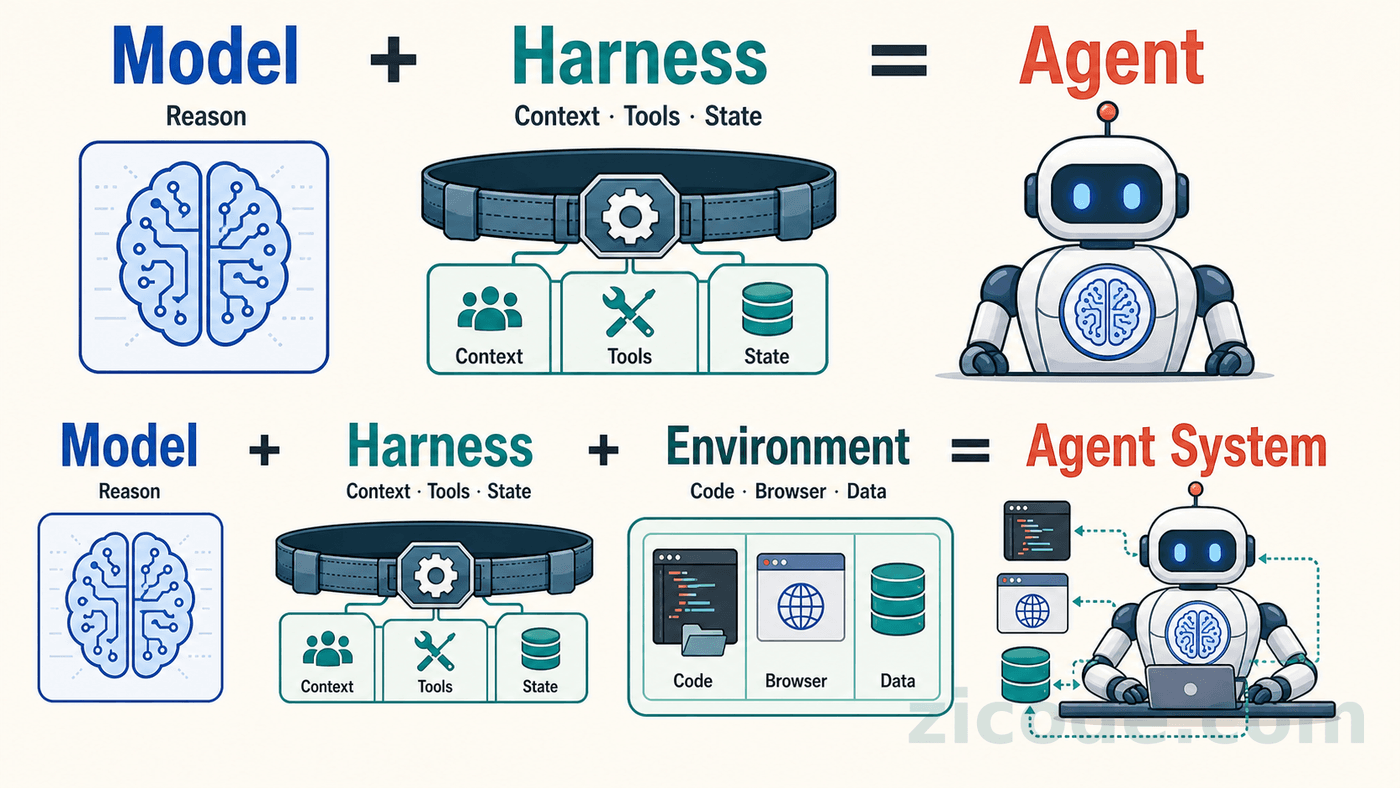
The model interprets the task, reasons, and proposes actions. The harness decides what the model can see, which tools it may call, how state is stored, and how execution resumes after failure. The environment provides the repository, browser, database, business APIs, and permission boundaries. Without the latter two layers, even a powerful model can do little more than offer advice in a chat window.
Recent work on Harness Engineering decomposes this runtime into task specification, context selection, tool access, project memory, task state, observability, failure attribution, verification, permissions, and human intervention. The goal is not merely to ask whether a model can generate a patch, but whether the whole system can deliver a change that is verifiable, attributable, and maintainable. AI Harness Engineering
That is why Agent interviews are becoming more demanding: the subject is no longer a framework API. It is a complete software system.
Draw the Enterprise Architecture First
Do not begin with LangGraph, AutoGen, or a particular SDK. Establish the system boundaries before choosing a framework.
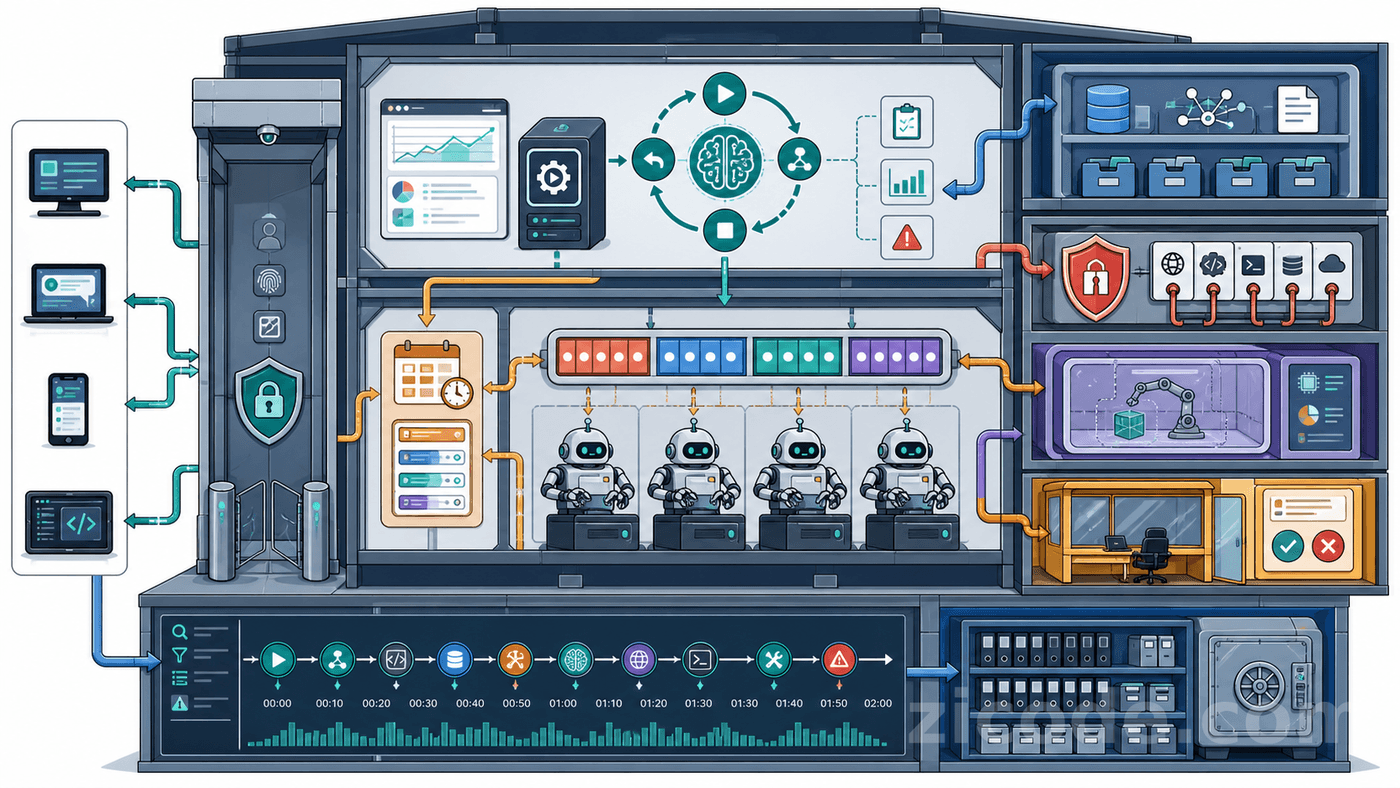
A durable enterprise Agent needs at least the following modules.
| Module | Primary responsibility | What it should not own |
|---|---|---|
| API Gateway | Authentication, tenant resolution, rate limiting, request entry | Agent step orchestration |
| Run Manager | Create, deduplicate, cancel, resume, and query runs | Direct tool execution |
| State Machine | Drive the Agent loop and constrain transitions | All business data |
| Planner | Decompose tasks, track dependencies, trigger replanning | Bypass authorization to call tools |
| Context Builder | Assemble each model input | Dump the database into chat history |
| Model Router | Select a model by difficulty, risk, latency, and cost | Decide business permissions |
| Scheduler | Queueing, concurrency, leases, retries, and backpressure | Hold long database transactions |
| Tool Gateway | Discover, validate, authorize, and execute tools | Expose secrets to the model |
| Sandbox | Isolate shell, browser, and code execution | Global scheduling |
| Memory Service | Write, merge, retrieve, and forget memories | Control the Agent loop |
| Approval Center | Review high-risk and irreversible actions | Repair tool arguments for the model |
| Trace / Eval | Record trajectories, evidence, metrics, and evaluation results | Mutate execution state |
How the Modules Communicate
Short queries can use HTTP or gRPC. A Run Manager lookup is one example. Long operations should enter a queue; a browser job that may run for ten minutes should not occupy an incoming request. State changes should be published as versioned events instead of forcing every module to read and write the same tables.
Three boundaries matter in particular:
- The Tool Gateway should not depend on the Planner’s internal objects. It should accept a stable Tool Call Contract.
- The Memory Service should not know a framework-specific message class. It should store versioned domain objects.
- A database transaction must not span a model call, tool call, file operation, or network request.
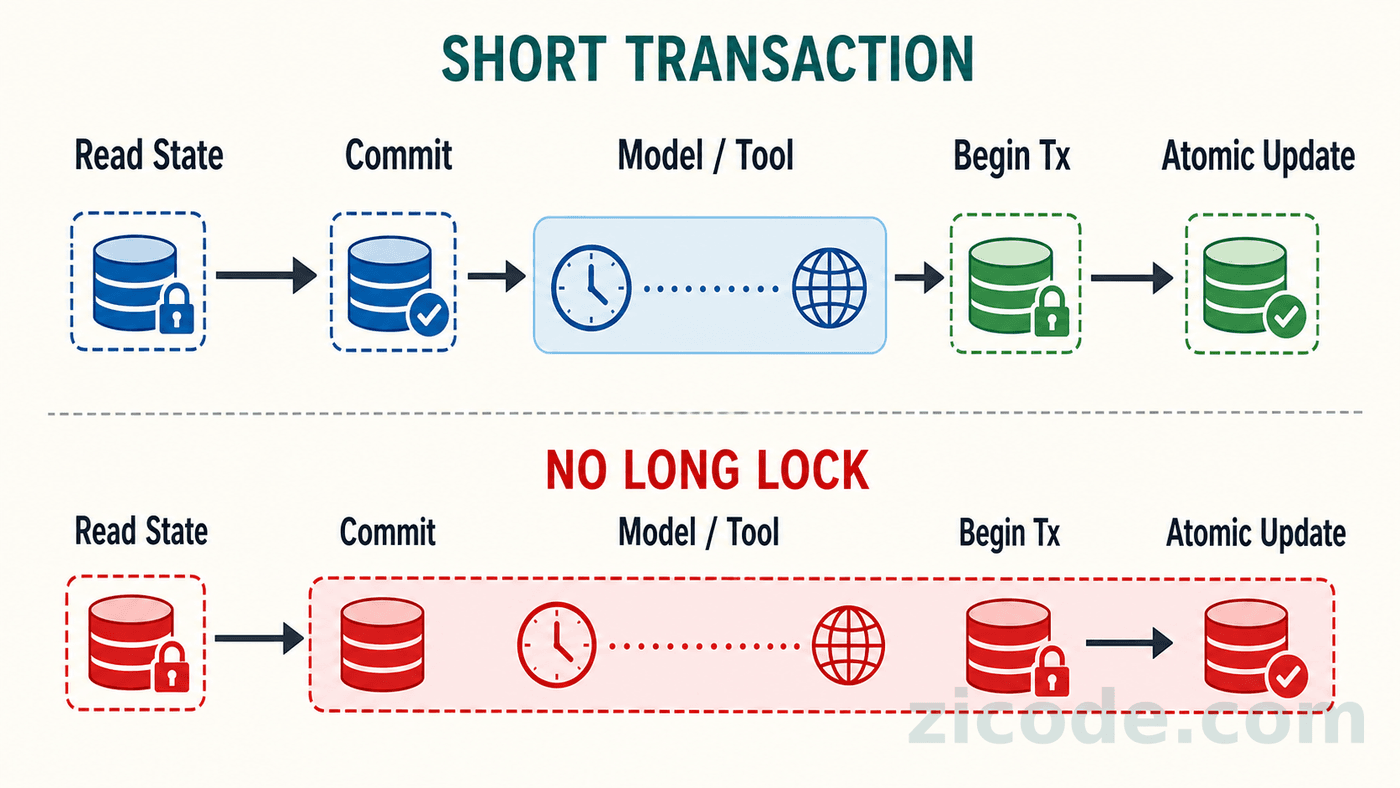
Sharing ORM entities, process-global state, or one long transaction may feel convenient in a single-process demo. It becomes a liability as soon as the system has multiple workers, retries, or rolling deployments.
Turning an Agent Loop into a Runtime
The smallest Agent loop often looks like this:
while not done:
    response = model(messages, tools=tools)
    if response.tool_call:
        result = execute(response.tool_call)
        messages.append(result)
    else:
        done = True
That is useful for teaching, not for production. It has no durable state, budget, cancellation, error taxonomy, concurrency control, approval, or completion evidence.
A more realistic loop looks like this:
Load run and checkpoint
  → Build the context for this step
  → Ask the model for the next action
  → Apply policy and permission checks
  → Execute a tool or wait for approval
  → Persist the observation
  → Update task state
  → Verify completion conditions
  → Continue, retry, replan, pause, or finish
Every step must answer three questions:
- Which version of state produced this input?
- Has this step already created an external side effect?
- If the process crashes now, where does the next worker resume?
The Model Does Not Decide When the Task Is Done
When a model outputs done, it only means that the model believes it is finished. The system still needs a verifier. A coding Agent should run target tests, relevant regressions, and inspect the workspace diff. A data Agent should verify the query range, row count, and metric definition. A support Agent should confirm that the ticket state actually changed.
Completion must be expressed as machine-observable state:
completion:
  required:
    - target_tests_passed
    - regression_tests_passed
    - no_unapproved_side_effects
    - final_evidence_attached
  max_steps: 100
  max_duration_seconds: 7200
max_steps is a safety limit, not a target. Evidence determines successful completion; the budget exists to terminate abnormal loops.
Why Long Runs Deteriorate
The first limit a long-running Agent usually hits is not model intelligence. It is context management.
If every tool result is appended to messages verbatim, the context grows without bound. More tokens do not merely increase cost. They bury key constraints beneath observations, preserve earlier mistakes, and encourage the model to repeat work it has already completed.
Do Not Truncate by the Last N Turns
Keeping the last ten turns is simple but unreliable. One browser DOM or log dump may be larger than ten ordinary turns, while the eleventh-oldest turn may contain an architectural decision that must not be lost.
A more robust approach assembles a mixed window under a token budget:
Fixed: system policy, goal, permissions, immutable constraints
Task: current plan, incomplete steps, latest checkpoint, key decisions
Dynamic: recent interactions, current tool summaries, retrieved memory
Reserved: model output, tool schemas, the next observation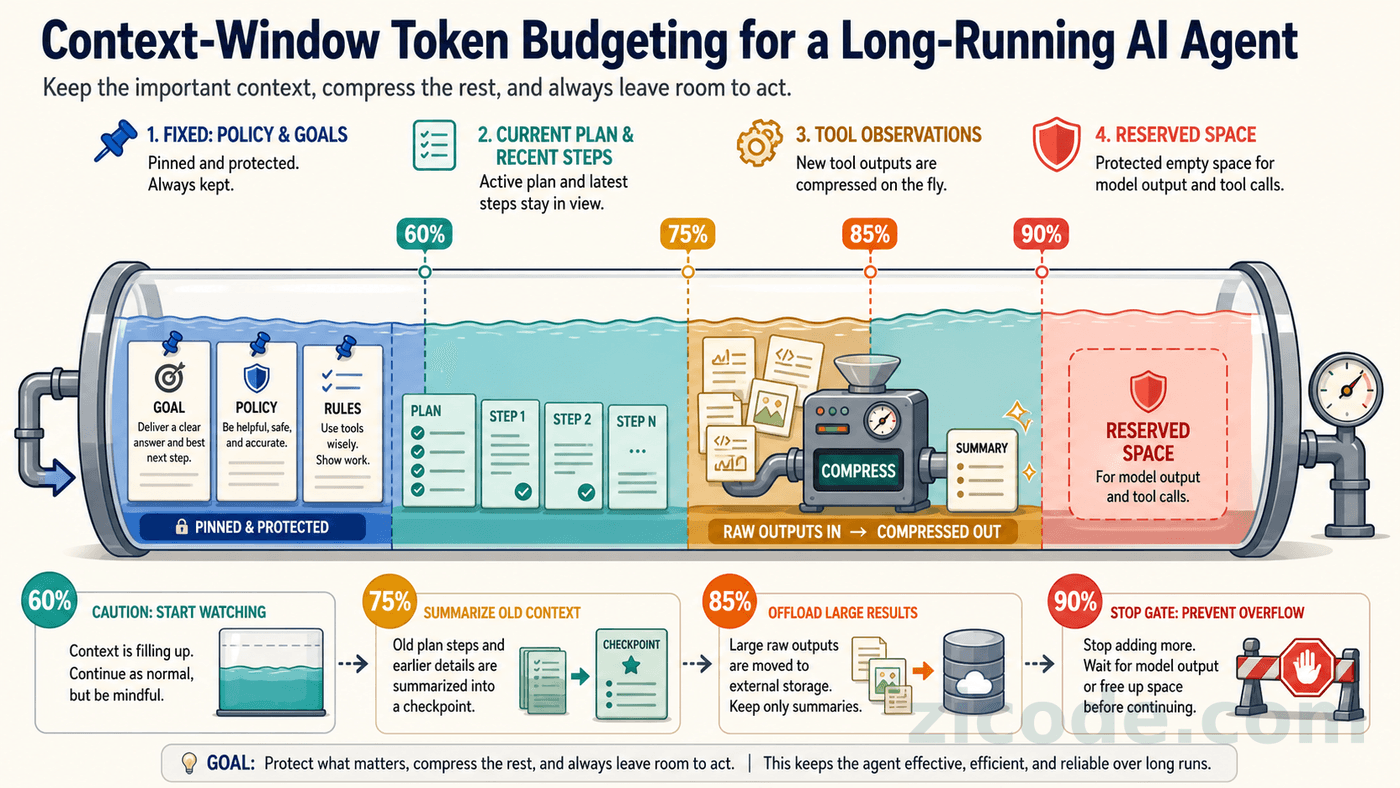
Choosing Thresholds
Do not wait for the model API to return context too long. A practical initial policy is:
| Context usage | Action |
|---|---|
| 60%–70% | Detect repetition; keep only summaries of large tool results |
| 75%–80% | Create a checkpoint and compact the older trajectory |
| 85% | Externalize large raw results; retain references and key facts |
| 90% | Stop expanding the task and reject unpredictable large outputs |
| Near the hard limit | Start a new thread from a checkpoint or return control to a human |
The usable input budget is not the model’s advertised context limit:
Usable input budget =
context limit
- maximum output budget
- tool schemas
- safety reserve
- serialization and formatting overhead
Reserve at least 10%–20% for output and unpredictable growth. Browser, log, and database tools may require more. These thresholds are not universal constants; calibrate them against real trajectories, output lengths, and tool-result distributions.
A Fallback Sequence Before Overflow
- Remove raw tool results that can be fetched again.
- Merge duplicate observations.
- Compact older steps into a checkpoint with evidence references.
- Load only the tools required for the current phase.
- Delegate independent work to a subagent with isolated context.
- Freeze the old thread and start a new one from structured state.
- Pause if the context still cannot be compacted; never silently discard constraints.
DeepSeek’s context cache can reduce latency and cost for repeated prefixes, but it cannot fix semantic pollution. It optimizes repeated computation, not information selection. DeepSeek Context Caching
The Interface Part 1 Leaves Behind
The Agent now has a runtime skeleton. A state machine constrains every step, slow calls do not hold database transactions, evidence determines completion, context is assembled under a budget, and checkpoints make process recovery possible.
Recoverable state does not guarantee trustworthy memory, and callable tools do not guarantee safe or idempotent execution. Part 2 addresses the three mechanisms that most often break a demo when it meets production: memory, tools, and multi-user concurrency.
Next: Part 2 will cover memory, tools, and multi-tenant concurrency. It has not been published yet.
Agent Interview Deep Dive: Part 1: Runtime and Context · Part 2: Memory, Tools, and Concurrency (coming soon) · Part 3: Evaluation, Safety, and Viability (coming soon)
Follow ZiCode on WeChat
If this post was useful, you can follow later updates on WeChat as well.

X / Twitter
Follow @ax2_zicode
Faster technical notes, short thoughts, and new-post alerts are posted on X.