Codex, Cursor, And The Codex Extension Inside Cursor
Codex, Cursor, And The Codex Extension Inside Cursor
AI coding tools are no longer mainly competing on completion speed. The real question is who can complete real engineering work more reliably.
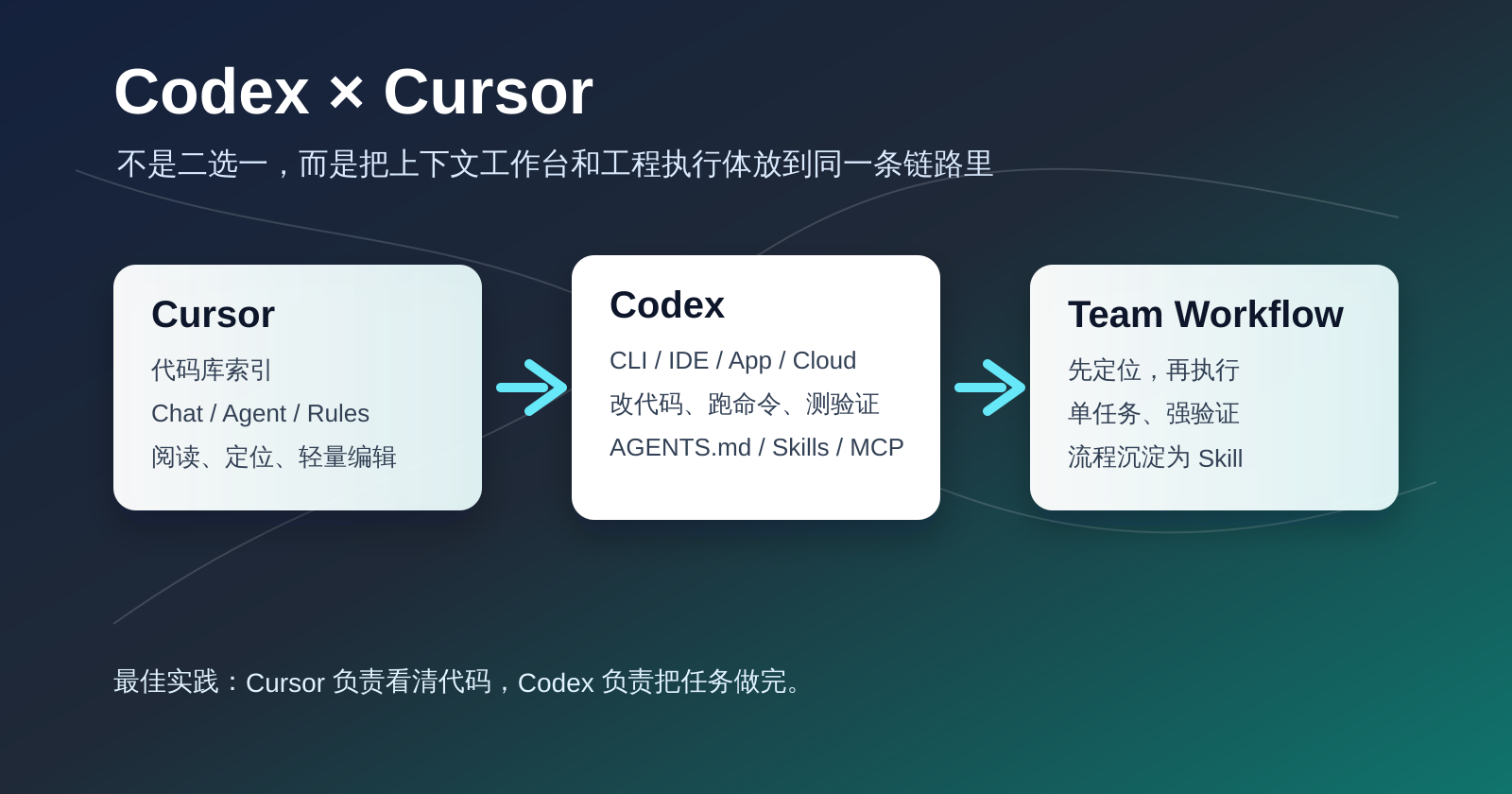
Cursor represents an editor-native AI experience: codebase indexing, chat, edits, diffs, custom modes, and workflows centered around the IDE. Codex is closer to a software engineering agent that can operate across CLI, IDE extension, app, cloud tasks, and GitHub review.
So “which is stronger, Codex or Cursor?” is usually the wrong question. A better one is: do you need an editor-aware workbench, or a configurable and reusable engineering agent that can execute tasks across surfaces?
My Short Recommendation
| Need | Better Fit |
|---|---|
| Ask questions while reading code, understand quickly, make light edits | Cursor Chat / Agent |
| Complex changes, commands, tests, and execution loop | Codex CLI or Codex extension inside Cursor |
| Long tasks, parallel work, running away from local machine | Codex Cloud / Codex App |
| Team workflows such as release, review, migration, and troubleshooting | Codex Skills / Plugins + AGENTS.md |
| Stay inside Cursor while using Codex agent capability | OpenAI Codex extension in Cursor |
They Are Not The Same Layer
Cursor is an AI-native code editor. Its strength is the editor scene: open files, current cursor position, project index, rules, and mode switching.
Codex is OpenAI’s software engineering agent. It can read, edit, and run code, and it appears through CLI, IDE extension, cloud, app, and GitHub integration.
The distinction is not “editor A versus editor B”:
| Dimension | Cursor | Codex |
|---|---|---|
| Primary identity | AI IDE | Software engineering agent |
| Main entry | Editor | CLI / IDE / App / Cloud |
| Strength | Context search, current-file understanding, IDE interaction | Task execution, commands, tests, review, cloud long tasks |
| Reuse mechanism | .cursor/rules, User Rules, Custom Modes | AGENTS.md, Skills, Plugins, MCP, config files |
| Best question | ”How does this code work and where should I edit?" | "Finish this task according to rules and verify it.” |
Codex IDE Extension
The Codex IDE extension puts Codex inside the editor. It can use open files, selections, and @file references, making prompts shorter and more precise. It supports model switching, reasoning effort, different permission modes, and delegation to Codex Cloud for larger tasks.
Advantages:
- Close to editor context.
- Local changes can be previewed and applied.
- Good bridge from discussion to execution.
- In Cursor, it can sit beside Cursor Chat.
Limitations:
- It is not part of Cursor’s own chat history.
- Cursor Rules and Codex instructions are different systems.
- Full Access and network access require care.
Use it when the task begins in the editor but needs Codex to take over implementation or verification.
Codex CLI
Codex CLI is better for terminal-heavy tasks: backend work, infrastructure, scripts, tests, remote machines, containers, and CI-like validation. It can read the repository, edit files, run commands, show diffs, and ask for approval.
Advantages:
- Natural fit for real shell workflows.
- Clearer permission and sandbox boundaries.
- Good for remote and script-heavy environments.
- Works well with
AGENTS.md, Skills, and repeatable procedures.
Limitations:
- Less visual than an IDE extension.
- Higher learning curve for non-terminal users.
- UI and browser-heavy work often still benefits from an editor or browser loop.
Codex Extension Inside Cursor
If you already live in Cursor, installing the Codex extension does not mean replacing Cursor Chat. It adds an OpenAI engineering-agent panel to your Cursor workspace.
A practical split:
| Stage | Cursor | Codex |
|---|---|---|
| Understand code | Strong | Usable |
| Find related files or similar implementations | Strong | Usable with rg and file reads |
| Plan | Both | Strong for complex execution |
| Edit files | Good for small edits | Better for complex tasks |
| Run commands and tests | Usable | Strong |
| Cloud long tasks | Not the main role | Strong |
| Save reusable process | Cursor Rules | AGENTS.md / Skills |
My preferred layout:
- Source and file tree on the left.
- Cursor Chat for codebase Q&A.
- Codex panel for execution, tests, and diff review.
- Terminal visible for verification.
A Good Handoff Pattern
Use Cursor Chat to explore. Then turn the result into a Codex task:
Goal:
Fix the search service so provider timeouts do not hold a database transaction open.

Context:
Cursor Chat identified these relevant areas:
- services/online/search_engine/api/...
- services/online/search_engine/retriever/...

Constraints:
- Do not hold DB transactions during slow external calls, network I/O, or model/API calls.
- Keep transactions fine-grained.
- Tests should mock external dependencies.

Done when:
- Implementation updated.
- Fast tests added or updated.
- Relevant pytest commands run.
- Summarize changes and remaining risk.
This is not about writing a long prompt. It is about converting exploration into an executable boundary.
Can Cursor Chat And Codex Coexist?
Yes, and they should.
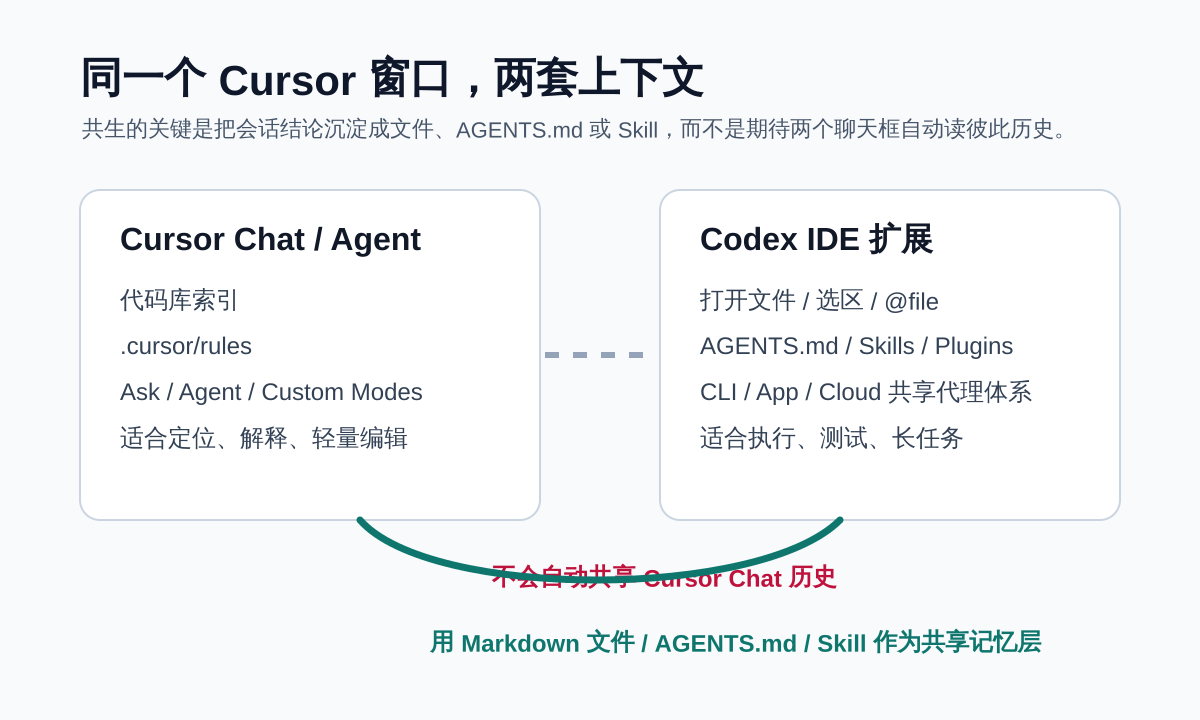
Cursor Chat is like a technical partner with strong codebase indexing. Codex is an engineering agent that can work inside the repository.
The safest split:
- Cursor Chat: read-only analysis, explanation, exploration, candidate plans.
- Codex: file edits, commands, tests, and fixing failures.
- Only one agent writes a given file set at a time.
- The other agent may review but should not edit simultaneously.
This avoids the worst failure mode: two capable agents changing the same files in different directions.
Can Codex Use Existing Skills?
If “Skill” means Codex Agent Skills, yes, as long as Codex can discover them. A Codex Skill is a directory with SKILL.md, and may include scripts, references, or assets. Skills can be used by Codex CLI, IDE extension, and app.
Do not confuse:
| Name | Belongs To | Role |
|---|---|---|
AGENTS.md | Codex and similar agents | Repository-level persistent instructions |
.cursor/rules | Cursor | Persistent rules for Cursor Chat / Agent / inline edit |
Codex SKILL.md | Codex | Reusable workflow with scripts and references |
| Codex Plugin | Codex | Bundle of Skills, apps, MCP, and integrations |
My rule: team engineering conventions go into AGENTS.md; Cursor interaction habits go into .cursor/rules; repeatable execution workflows become Codex Skills.
Can Codex Read Cursor’s Session?
Usually not directly. Cursor Chat history and Codex session history are separate. If Cursor discovered something useful, summarize it and hand it to Codex explicitly.
This separation is not a bug. It forces the boundary to be clear: exploration on one side, execution on the other.
Closing
Cursor and Codex are not redundant. Cursor is still excellent as an editor-centered context surface. Codex is stronger as a cross-surface execution agent.
The most practical workflow is not “replace one with the other.” It is: use Cursor to understand and shape the task, then use Codex when the work needs disciplined execution, commands, tests, review, or cloud handoff.
Follow ZiCode on WeChat
If this post was useful, you can follow later updates on WeChat as well.

X / Twitter
Follow @ax2_zicode
Faster technical notes, short thoughts, and new-post alerts are posted on X.
