
Small Models Are Moving Back onto Devices
My interest in small on-device models does not come from slogans like “put a large model into a phone.” It comes from a concrete product need: an offline meeting assistant. It should run on laptops and phones, generate local summaries in meeting rooms without network access, remove sensitive information on the device first, and only send desensitized material to the cloud when the user explicitly wants a stronger fallback.
This sounds like a small feature, but it exposes almost every hard part of edge AI: model download, cold start, NPU and CPU fallback, local summarization after transcription, privacy-aware caching, cloud fallback switches, device fragmentation, staged rollout, rollback, and acceptance criteria. A small on-device model is not a miniature cloud model. It is more like a long-lived product module that has to live inside the user’s device.
This article uses the offline meeting assistant as the running example. It is not an internal implementation of any real product. Names, URLs, tokens, and customer data are all replaced with public examples.
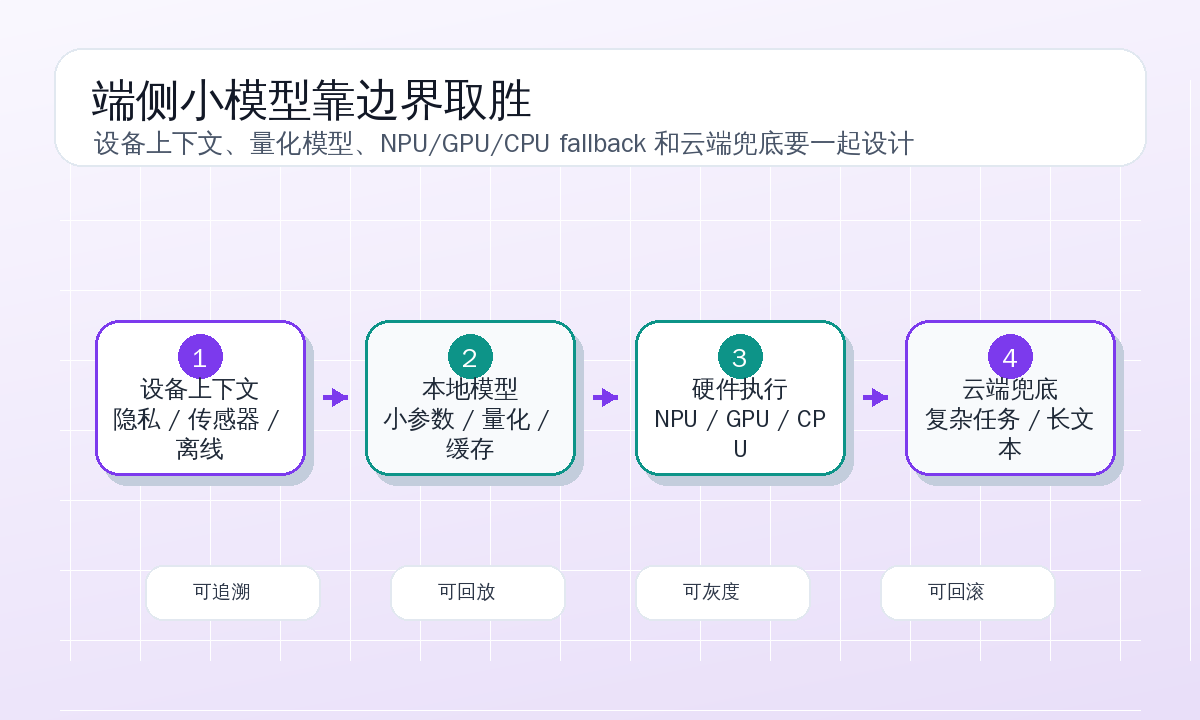
Narrow the Product Boundary First
The first version of the offline meeting assistant promises only four things.
It can process local meeting-transcript text and generate five to eight key points. It can detect and mask obvious phone numbers, email addresses, ID-like fields, and contract-number-like fields. With user consent, it can send a desensitized summary and segment index to the cloud so the cloud can generate a more complete note. When there is no network, it can save a draft locally and sync only after user confirmation.
It does not promise automatic speaker identification for every meeting. It does not promise legal-grade fact checking. It does not answer the latest policy questions offline. It does not try to squeeze a two-hour meeting into a small model context. Narrowing the boundary is not conservatism. On-device products must be honest about resources and trust.
The first local pipeline looks like this:
audio file or live transcript
  -> local segmenter
  -> privacy preprocessor
  -> small-model summarizer
  -> local draft and segment index
  -> user confirmation
  -> optional cloud fallback
The small model is not the only protagonist. Segmentation, redaction, caching, permissions, and fallback matter just as much. Good edge AI is often not about an especially smart model. It is about every step knowing how much it should do.
What a Local Request Looks Like
A local API does not need to imitate the cloud OpenAI API, but structured requests make debugging and replay much easier. The meeting assistant sends this kind of request to the local inference service:
{
  "request_id": "local_meeting_20260615_001",
  "mode": "offline_summary",
  "device_context": {
    "platform": "macos",
    "power": "battery",
    "network": "offline",
    "accelerator": "ane",
    "memory_pressure": "normal"
  },
  "privacy_policy": {
    "redact_before_cache": true,
    "allow_cloud_fallback": false,
    "retention_hours": 24
  },
  "input": {
    "meeting_title": "Product weekly meeting",
    "language": "zh-CN",
    "segments": [
      {
        "start_ms": 12000,
        "end_ms": 42600,
        "speaker": "S1",
        "text": "This week we should first make offline summaries a beta feature and avoid uploading audio by default."
      },
      {
        "start_ms": 43100,
        "end_ms": 86500,
        "speaker": "S2",
        "text": "If users enable cloud enhancement, upload only the redacted summary and segment index."
      }
    ]
  },
  "output": {
    "max_bullets": 8,
    "include_actions": true,
    "include_risks": true
  }
}
The response should also explain what happened locally:
{
  "request_id": "local_meeting_20260615_001",
  "status": "ok",
  "summary": [
    "The offline-summary beta will not upload audio by default.",
    "Cloud enhancement must be explicitly enabled and should receive only redacted summaries and segment indexes."
  ],
  "actions": [
    {
      "owner": "unknown",
      "text": "Add copy for the cloud-enhancement authorization dialog.",
      "evidence_segment_ids": [2]
    }
  ],
  "redactions": [
    {
      "type": "email",
      "count": 1,
      "replacement": "[EMAIL_1]"
    }
  ],
  "runtime": {
    "model": "meeting-summarizer-1.8b-q4",
    "backend": "ane",
    "input_tokens": 1462,
    "output_tokens": 214,
    "prefill_ms": 382,
    "decode_ms": 1040,
    "peak_memory_mb": 1180,
    "cloud_fallback_used": false
  }
}
This structured response has two benefits. Product UI can clearly show “cloud not used,” “redacted,” and “local draft retained for 24 hours.” Engineering can know whether the model ran on the accelerator, how long it took, and whether fallback was used, without logging the original transcript.
Device Capability Comes Before Model Rankings
A common mistake in on-device AI projects is choosing a model from a benchmark first, then trying to make it run. The meeting assistant does the opposite: define the device matrix first, then choose the model.
The first version covers only three device classes:
| Device tier | Goal | Allowed strategy |
|---|---|---|
| High-end laptop | Draft for a 10-minute meeting within 15 seconds | Local summary, redaction, optional cloud enhancement |
| Mainstream phone | Draft for a 10-minute meeting within 30 seconds | Local short summary, low-battery degradation |
| Low-end or old device | Privacy preprocessing and segment index only | Do not force long local summaries |
Device detection happens at feature entry, not after inference fails:
{
  "device_id_hash": "dev_anon_7f2a",
  "platform": "android",
  "os_version": "15",
  "app_version": "1.4.0",
  "accelerators": ["nnapi", "cpu"],
  "recommended_backend": "nnapi",
  "available_memory_mb": 3260,
  "battery_level": 0.42,
  "thermal_state": "nominal",
  "model_profile": "meeting-lite"
}
If a device can only run meeting-lite reliably, the UI should not promise a “complete note.” It can offer two clear choices: “local key points” and “cloud enhancement.” Much of the on-device AI experience comes from honesty, not from hiding every capability behind one button.
A Model Package Is More Than One File
The assistant uses two local model packages. A very small one handles privacy preprocessing and intent classification. A larger one generates meeting-summary drafts. They are released together with the tokenizer, prompt templates, and post-processing rules.
A model manifest can look like this:
models:
  - id: privacy-filter-280m-q8
    role: privacy_preprocess
    size_mb: 210
    min_app_version: "1.4.0"
    backends: ["ane", "nnapi", "cpu"]
    checksum: "sha256:example-privacy-filter"
    retention: bundled
  - id: meeting-summarizer-1.8b-q4
    role: offline_summary
    size_mb: 1260
    min_app_version: "1.4.0"
    backends: ["ane", "nnapi", "directml", "cpu"]
    checksum: "sha256:example-meeting-summarizer"
    download:
      wifi_only: true
      resume: true
      keep_previous_version: true
prompts:
  summary_template_version: "summary-v6"
  action_template_version: "action-v3"
postprocess:
  schema_version: "meeting-note-v2"
Version binding is easy to underestimate. A new model may require a new tokenizer or change its output format. Replacing only the weight file without updating prompts and post-processing can break client parsing. On-device release is harder than server-side release because a bad version has already reached user devices. Restarting a pod does not make it disappear.
So a model package needs signatures, checksums, minimum app version, and a previous version that can be rolled back to. Downloads must be resumable. Users should not get stuck before a meeting because a 1GB file did not finish.
Local Summaries Should Not Stuff the Whole Meeting into Context
Small models have limited context, and mobile devices are even more constrained. The assistant does not feed the whole meeting into the model at once. It segments first, generates local drafts per segment, and then merges. A 45-minute meeting may become 20 to 40 segments.
The segmenter mixes simple rules and a lightweight model: silence longer than a threshold, topic-keyword changes, speaker changes, and token limits per segment. Each segment produces a local draft:
{
  "segment_id": 12,
  "time_range": "00:18:22-00:21:05",
  "input_tokens": 1180,
  "local_summary": "The team decided that the beta version should save local drafts by default, and cloud enhancement should require explicit user confirmation.",
  "actions": [
    "Add authorization dialog copy",
    "Write cloud-enhancement upload fields into the privacy notice"
  ],
  "risk_flags": ["privacy_notice_required"]
}
The global summary reads these local drafts and a small number of evidence snippets, not the full transcript. This sacrifices some cross-segment reasoning, but gains stable memory use, explainable evidence, and lower privacy risk.
On-device small models are good at producing “good enough drafts.” They should not be treated as decision makers. Meeting notes especially need evidence snippets so the user can click back to the original sentence. A beautiful summary without evidence may look smart in a demo and become dangerous at work.
Privacy Preprocessing Happens Before Caching
“Data does not leave the device” does not automatically solve privacy. The assistant still caches drafts, segment indexes, and intermediate model outputs locally. If that cache contains phone numbers, emails, or contract IDs, the risk remains on the device for a long time.
So privacy preprocessing happens before persistent caching. The raw transcript stays only in protected temporary storage and expires after 24 hours by default. Anything entering persistent cache must be redacted first.
privacy:
  raw_transcript:
    storage: protected_tmp
    ttl_hours: 24
    sync: false
  redacted_segments:
    storage: encrypted_local_db
    ttl_days: 30
    sync: optional
  cloud_payload:
    allowed_fields:
      - redacted_summary
      - action_items
      - evidence_segment_ids
      - language
    denied_fields:
      - raw_audio
      - raw_transcript
      - speaker_voiceprint
Redaction should not rely only on a model. Deterministic rules handle email addresses, phone numbers, ID-like patterns, and bank-card-like patterns. A small model handles contextual entities such as customer names, internal project aliases, or contract numbers. Neither is perfect, so the UI must let users review what will be uploaded.
The cloud-fallback request therefore looks like this:
{
  "request_id": "cloud_enhance_20260615_001",
  "consent_id": "consent_local_9a21",
  "source": "offline_meeting_assistant",
  "payload": {
    "language": "zh-CN",
    "redacted_summary": [
      "The team decided that the beta version should save local drafts by default.",
      "[PROJECT_1] needs authorization dialog copy and privacy-notice updates."
    ],
    "action_items": [
      "Add authorization dialog copy",
      "Confirm upload fields for cloud enhancement"
    ],
    "evidence_segment_ids": [3, 12, 18]
  }
}
There is no raw audio, no full transcript, no real names, and no email addresses. The cloud receives material that has already been processed locally. This path is less “clever” than uploading everything, but it is much easier for users and enterprise security teams to accept.
Cloud Fallback Is a Normal Path, Not a Failure Path
Many edge-AI designs treat cloud fallback as “call cloud only when local fails.” The meeting assistant does not. Cloud enhancement is a visible normal path: local draft first, then the user reviews the redacted content and chooses whether to enhance it.
In local mode, users get key points, action items, and risk hints. In cloud-enhanced mode, they can get fuller sections, decision context, conflict summaries, and formatted minutes. The two modes are not replacements for each other. They are different choices across cost, privacy, and quality.
Engineering should also avoid double work. Cloud enhancement does not process the meeting from scratch. It receives local summaries, action items, segment indexes, and a few redacted evidence snippets. That keeps cloud context shorter, cost lower, and user understanding clearer.
If enterprise policy forbids cloud use, the feature still works; it simply does not show the enhancement entry:
{
  "policy": "local_only",
  "features": {
    "offline_summary": true,
    "privacy_preprocess": true,
    "cloud_enhance": false,
    "share_redacted_note": true
  },
  "message_code": "cloud_disabled_by_policy"
}
This error meaning matters more than a generic “network unavailable.” Users need to know whether the cause is offline state, policy restriction, low-battery degradation, or unsupported hardware.
Metrics Record Runtime State, Not Meeting Content
Edge AI still needs observability. Without it, production issues become screenshots sent to support. The hard part is that user meeting content must not be uploaded. The assistant reports only anonymous runtime metrics and failure reasons.
The first version uses these fields:
| Field | Purpose |
|---|---|
event | model_loaded, summary_completed, fallback_used, and so on |
app_version | Debug client-version issues |
model_id | Model and quantization version |
backend | ane, nnapi, directml, or cpu |
device_tier | Anonymous high, mid, or low tier |
network_state | Online, offline, weak network |
battery_state | Plugged in, battery, low battery |
thermal_state | Nominal, warm, or thermal degradation |
input_token_bucket | Bucket only; no transcript |
latency_ms | End-to-end latency |
prefill_ms | Input-processing time |
decode_ms | Generation time |
peak_memory_mb | Peak memory |
fallback_reason | CPU fallback, missing model, policy restriction |
redaction_count_bucket | Redaction count bucket, not specific values |
One report looks like this:
{
  "event": "summary_completed",
  "app_version": "1.4.0",
  "model_id": "meeting-summarizer-1.8b-q4",
  "backend": "nnapi",
  "device_tier": "mid",
  "network_state": "offline",
  "battery_state": "battery",
  "thermal_state": "nominal",
  "input_token_bucket": "8k-16k",
  "latency_ms": 23840,
  "prefill_ms": 6920,
  "decode_ms": 11860,
  "peak_memory_mb": 1420,
  "fallback_reason": "none",
  "cloud_fallback_used": false
}
It intentionally does not upload meeting titles, speakers, summary text, or concrete redacted values. Observability for on-device features should be restrained. Losing a little telemetry is better than destroying the trust advantage.
Debugging: Why One Phone Became Three Times Slower
During the pilot, one typical issue appeared: the same 10-minute meeting sample produced a draft in 11 seconds on a high-end laptop, while a mid-range phone sometimes took 24 seconds and sometimes almost 70 seconds. The model and input were unchanged.
The investigation did not start from model quality. It started from metric buckets. Slow requests shared three signals: backend=cpu, thermal_state=warm, and fallback_reason=accelerator_compile_failed. In other words, NNAPI compilation failed and fell back to CPU, while the phone was warm and had already lowered its frequency.
Local logs then showed failures concentrated around one operator combination. A dynamic-shape section in the model was unstable on a certain driver version. The fix was not telling users to retry. The fix was to ship a meeting-lite profile for that device family, limit segment length, and disable the graph optimization that triggered the problem.
device_overrides:
  - match:
      platform: android
      accelerator: nnapi
      driver_family: "example-driver-31"
    model_profile: meeting-lite
    max_segment_tokens: 900
    graph_optimizations:
      dynamic_shape_fusion: false
    fallback:
      allow_cpu: true
      max_latency_ms: 45000
This is a different debugging rhythm from server-side AI. A slow server request sends you to pods, GPUs, and queues. A slow edge request sends you to temperature, driver version, backend, memory pressure, power state, and whether the model was just downloaded. Without anonymous metrics, the team can only guess on a few test devices.
Release: Model Rollout Should Look Like Client Rollout
Releasing the meeting assistant is not just putting a model file on a CDN. The first release has four layers: client code, model manifest, model file, and remote policy. Any layer may need rollback.
A practical release starts with client version 1.4.0, bundled only with the privacy-filter model. The summary model is downloaded on demand. The feature entry is enabled for 5% of beta users by default:
rollout:
  app_min_version: "1.4.0"
  audience: beta
  percent: 5
  default_mode: local_summary
  cloud_enhance_default: off
Then ship the model manifest without automatically downloading the large model. When the user enters the meeting assistant, and the device qualifies on Wi-Fi, prompt for download:
download_policy:
  meeting-summarizer-1.8b-q4:
    wifi_only: true
    require_battery_level_gte: 0.3
    allow_metered_network: false
    keep_previous_version: true
Then expand to 20% while watching model-load success, download failures, summary completion rate, CPU fallback ratio, and low-battery degradation ratio. The core metric is not DAU. It is device-side runtime health.
Cloud enhancement opens last and needs its own rollout because it involves consent copy, redacted payloads, server cost, and enterprise policy:
cloud_enhance:
  percent: 10
  require_user_consent: true
  upload_payload: redacted_only
  max_payload_tokens: 6000
  blocked_when:
    - enterprise_policy_local_only
    - redaction_confidence_low
This pace is slower, but on-device features need that patience. Once a bad model reaches many devices, recovery costs much more than on the server.
Rollback: Bad Versions on User Devices Do Not Vanish Automatically
There are four rollback cases.
If it is only a policy issue, such as unclear cloud-enhancement consent copy, turn off the remote switch:
features:
  cloud_enhance:
    enabled: false
    reason: "consent_copy_revision"
If it is a model-quality issue, point the manifest back to the previous version, while keeping the already downloaded new model but no longer selecting it. Do not delete it immediately, or users on weak networks may download repeatedly.
models:
  meeting_summary_active: meeting-summarizer-1.8b-q4-20260610
  meeting_summary_blocked:
    - id: meeting-summarizer-1.8b-q4-20260615
      reason: "action_item_regression"
If it is a runtime problem for one device family, downgrade only that family to the lite model or CPU path. Do not roll back everyone and sacrifice devices that already work well.
device_overrides:
  - match:
      device_tier: mid
      backend: nnapi
      os_version_lte: "15"
    force_model: meeting-summarizer-lite-900m-q4
Only a client parsing crash requires an urgent app release, together with a remote policy that disables the related model capability. An edge system must assume some users will not upgrade immediately, so backward compatibility for old clients must stay for a while.
Rollback drills should be real. Acceptance is not a written plan. On test devices, switch the model from new to old and verify drafts still open, caches are not corrupted, and users do not lose meeting records.
Acceptance: Edge AI Must Work and Stay Out of the Way
The first version of the assistant has explicit acceptance lines:
| Metric | Acceptance |
|---|---|
| 10-minute meeting draft on high-end laptop | P95 below 15 seconds |
| 10-minute meeting draft on mid-range phone | P95 below 30 seconds |
| Local privacy preprocessing | Recall above 99% for email and phone-like patterns |
| Cloud payload | No raw audio or full transcript |
| Model cold start | Warm start below 2 seconds, cold start below 8 seconds |
| CPU fallback ratio | Below 5% on supported devices |
| Low-battery degradation | Large model does not start below 20% battery |
| Crash rate | Beta users no more than 0.1 percentage point above baseline |
| Rollback time | Remote policy effective within 5 minutes |
| User-visible control | Users can view local storage, upload content, and clear cache |
Quality acceptance cannot rely only on automated scores. We prepare meeting samples: short standups, product reviews, customer interviews, technical troubleshooting, and project syncs with many numbers. Each has a human reference summary. We check three things: whether key decisions were missed, whether action items were hallucinated, and whether sensitive fields leaked.
Edge has a special acceptance criterion: do not disturb. Model download must not consume user traffic unexpectedly. Large models should not run on low battery. When the phone is warm, long summaries should stop or degrade. When the user disables cloud enhancement, the app must not upload quietly. Many AI features fail by being too eager. Edge features especially need restraint.
What This Really Changes
After building this offline meeting assistant, my view of on-device small models became simpler.
They are not replacements for cloud LLMs. They are better as the first layer: close to the data, fast to respond, privacy-sensitive, offline-capable, and cost-stable. They turn raw material into cleaner, shorter, more structured intermediate results. The cloud handles more complex reasoning and fuller expression, but only when the user knows and agrees which data leaves the device.
Development also requires a mindset shift. Server-side AI projects revolve around throughput, queues, and GPU cost. Edge AI cannot avoid battery, heat, package size, download, drivers, cache, permissions, and rollback. NPU is not an automatic acceleration button, and a small model is not useful just because it is bundled into an app.
The most reliable path starts from a narrow scenario. For the meeting assistant, first do local summary, privacy preprocessing, and explicit cloud-enhancement consent well. Run through request samples, configuration, metrics, debugging, release, rollback, and acceptance before adding more capabilities. Edge AI is not finally judged by the sentence “runs locally.” It is judged by whether it can run on user devices for a long time, reliably and explainably.
When a feature can produce a usable draft without network access, explain exactly what will be uploaded when online, degrade on low battery, and roll back to an old model when something breaks, then it has entered the product stage. Otherwise, it is only a demo.
References
Follow ZiCode on WeChat
If this post was useful, you can follow later updates on WeChat as well.

X / Twitter
Follow @ax2_zicode
Faster technical notes, short thoughts, and new-post alerts are posted on X.
