
Quant Trading for Programmers 35: Generate An Operations Checklist
Quant Trading for Programmers 35: Generate An Operations Checklist
Articles 31-34 added a run window, daily report archive, historical summary, and data-gap plan.
Article 35 brings these states together into a small operations checklist. Before the daily process actually executes, the system checks this list instead of relying on someone to remember every precondition.
Checklists Should Be Short And Accurate
More checklist items do not automatically make operations safer.
For the early paper-trading system, four things matter most:
| Check | Input | Failure Meaning |
|---|---|---|
run_window | RunWindowStatus | The current time is outside the allowed run window |
history_ready | RunHistorySummary | There is no historical archive to reference |
data_gaps | DataGapPlan | Required market prices are missing |
run_health | RunHealthReport | The recent run health status is blocker |
These four checks do not judge strategy performance. They only answer whether the system can run today in a trustworthy way.
The Checklist Object
Chapter 35 adds app/ops_checklist.py.
@dataclass(frozen=True)
class OpsChecklistItem:
    name: str
    passed: bool
    detail: str


@dataclass(frozen=True)
class OpsChecklist:
    passed: bool
    items: tuple[OpsChecklistItem, ...]
detail stays as a short string rather than a complex structure. For daily reports, command-line output, and test assertions, that is already enough.
Compose Four States
The constructor only composes existing states. It does not recalculate business logic.
items = (
    OpsChecklistItem("run_window", window_status.allowed, window_status.reason),
    OpsChecklistItem("history_ready", history_summary.report_count > 0, history_summary.latest_status),
    OpsChecklistItem("data_gaps", not gap_plan.gaps, gap_plan.severity),
    OpsChecklistItem("run_health", health_report.status != "blocker", health_report.status),
)
Then it uses all items to decide the final result:
return OpsChecklist(
    passed=all(item.passed for item in items),
    items=items,
)
This intentionally avoids a complicated “partially passed” status. Before a paper-trading run, the first version only needs a clear go/no-go answer.
go/no-go is a common operations term. go means the preconditions are good enough to continue. no-go means at least one critical condition failed, so the run should pause, data should be repaired, or someone should confirm the situation manually. It does not answer whether the strategy is good. It only answers whether this run can start safely.
Current Integrated Run
Article 35 closes the loop with the same command:
uv run python -m scripts.chapter_examples paper-ops-checkIn the command output, the run window, history summary, and run health all pass, but the data-gap check fails:
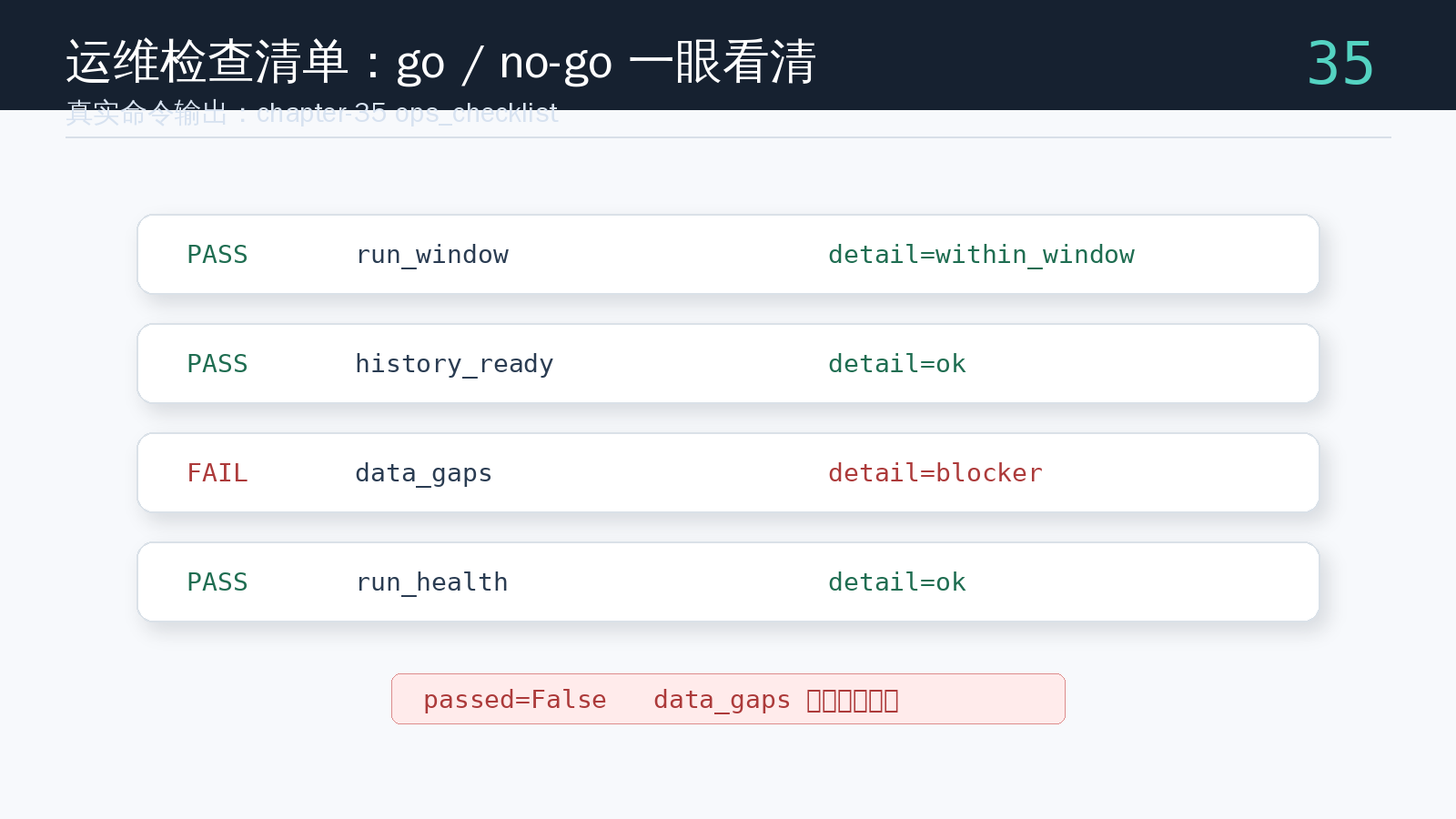
The final result is passed=False. That is exactly what the checklist is for: the system should not continue just because most modules succeeded. If one critical precondition fails, it should return a clear no-go result.
Test Passing And Failing Inputs
The tests cover two kinds of input.
With healthy input, the whole checklist passes and the item order stays stable:
assert checklist.passed is True
assert [item.name for item in checklist.items] == [
    "run_window",
    "history_ready",
    "data_gaps",
    "run_health",
]
With failing input, the test confirms that the failed items are the run window, history, and health report:
failed = {item.name for item in checklist.items if not item.passed}
assert failed == {"run_window", "history_ready", "run_health"}
Run the tests:
uv run pytest tests/test_ops_checklist.py tests/test_run_window.py tests/test_run_history.py tests/test_run_health.pyChapter Update And Repository
This chapter adds:
app/ops_checklist.py.OpsChecklistItemandOpsChecklist.- A combined view of the run window, history summary, data-gap plan, and run health status.
- A stable go/no-go checklist result.
- An integrated
paper-ops-checkexample showing a real no-go result. - The engineering meaning of go/no-go before a daily paper-trading run.
tests/test_ops_checklist.py, covering both healthy and failing inputs.- A stage review for articles 31-35.
Repository:
https://github.com/ax2/zi-quant-platformCode for this chapter:
git clone https://github.com/ax2/zi-quant-platform.git
cd zi-quant-platform
git checkout chapter-35
uv sync --extra dev
uv run pytest tests/test_ops_checklist.py tests/test_run_window.py tests/test_run_history.py tests/test_run_health.py
Chapter 35 is commit fc242ec, tagged as chapter-35.
Stage Review: Articles 31-35
The seventh group of five articles moves the paper-trading system from “able to generate one daily report” to “able to be operated every day.”
Article 31 adds a run window to the daily task so it does not run at the wrong time.
Article 32 archives notifications, health reports, and review records as stable JSON, giving each daily run evidence.
Article 33 reads the archive directory and summarizes run history, blocker counts, and notification success rate.
Article 34 detects market data gaps and turns missing prices into blocker-level structured results.
Article 35 combines those states into an operations checklist and gives the daily process a clear go/no-go decision.
This group does not chase more complicated strategy logic. It keeps reinforcing the system boundary. Once run time, historical evidence, market-data completeness, and health status can all be checked, problems become easier to locate when the system later connects to real scheduling or additional data sources.
The main code path now also has a cross-chapter command:
uv run python -m scripts.chapter_examples paper-ops-checkIt links articles 31-35 into one runnable demonstration: check the run window, write a daily report archive, summarize run history, detect price gaps, and finally generate the operations checklist. When the next group of articles introduces a real daily command, it can call this checklist first to decide whether to continue.
Summary
An operations checklist is the gate before a paper-trading run.
Article 35 makes the system answer four questions before execution: can it run now, does history exist, is market data complete, and did recent health block the system? The next step is to connect this checklist to a real daily command and move the paper-trading workflow from function composition to an executable job.
Follow ZiCode on WeChat
If this post was useful, you can follow later updates on WeChat as well.

X / Twitter
Follow @ax2_zicode
Faster technical notes, short thoughts, and new-post alerts are posted on X.

More in this column
- Quant Trading for Programmers 39: Turn Failed Checks Into Actions
- Quant Trading for Programmers 38: Index Daily Report Archives
- Quant Trading for Programmers 37: Generate Daily Run Results
- Quant Trading for Programmers 36: Shape The Daily Run Request
- Quant Trading for Programmers 34: Detect Market Data Gaps
- Quant Trading for Programmers 33: Summarize Paper-Trading Run History
- Quant Trading for Programmers 32: Archive Daily Run Results As JSON
- Quant Trading for Programmers 31: Add A Run Window To Daily Jobs