
Quant Trading for Programmers 31: Add A Run Window To Daily Jobs
Quant Trading for Programmers 31: Add A Run Window To Daily Jobs
Article 30 generated a daily run health report. The system can now tell whether a paper-trading run is healthy, warning-level, or blocked.
Article 31 starts handling another production concern: jobs should not run whenever they happen to be triggered. If a paper-trading daily report runs before the market data is complete, adjustment factors are updated, or manual confirmation is finished, the result is not trustworthy no matter how polished it looks.
What The Run Window Solves
Scheduled jobs usually fail in two painful ways.
One failure is running too late or not running at all, leaving a missing daily report. The other is running too early and generating recommendations from incomplete data.
Chapter 31 does not connect directly to cron or bind itself to a particular scheduling platform. It extracts a small object instead: given the current time and an allowed run window, decide whether the job may run now. If it cannot run, return the next window start time to the caller.
| Scenario | Result |
|---|---|
| Current time is inside the window | allowed=True |
| Current time is outside the window | allowed=False, with next_run_at |
| The window crosses midnight | Supports settings such as 23:00 to 01:00 |
The Run Window Object
Chapter 31 adds app/run_window.py.
@dataclass(frozen=True)
class RunWindow:
    start: time
    end: time
    timezone_name: str = "Asia/Shanghai"


@dataclass(frozen=True)
class RunWindowStatus:
    allowed: bool
    reason: str
    next_run_at: datetime | None = None
timezone_name is only configuration context for now. The current check uses the timezone already carried by the incoming datetime. That keeps the first version simple enough; once a real scheduler is connected, timezone conversion can be centralized later.
The Decision Logic
A normal time window is easy: start <= now <= end.
A window that crosses midnight needs a separate branch. For example, for 23:00 to 01:00, 00:30 should still be allowed.
def is_within_run_window(now: datetime, window: RunWindow) -> bool:
    current = now.time()
    if window.start <= window.end:
        return window.start <= current <= window.end
    return current >= window.start or current <= window.end
When the current time is outside the window, the module calculates the next start time.
candidate = datetime.combine(now.date(), window.start, tzinfo=now.tzinfo)
if candidate <= now:
    candidate += timedelta(days=1)
This logic does not sleep and does not start a background task. It only returns a deterministic decision so an upper-level scheduler can skip, delay, or alert.
Current Integrated Run
Articles 31-35 can now run through one command:
uv run python -m scripts.chapter_examples paper-ops-checkThe command checks the run window first, then generates the archive, history summary, data-gap plan, and operations checklist. The run-window section looks like this:
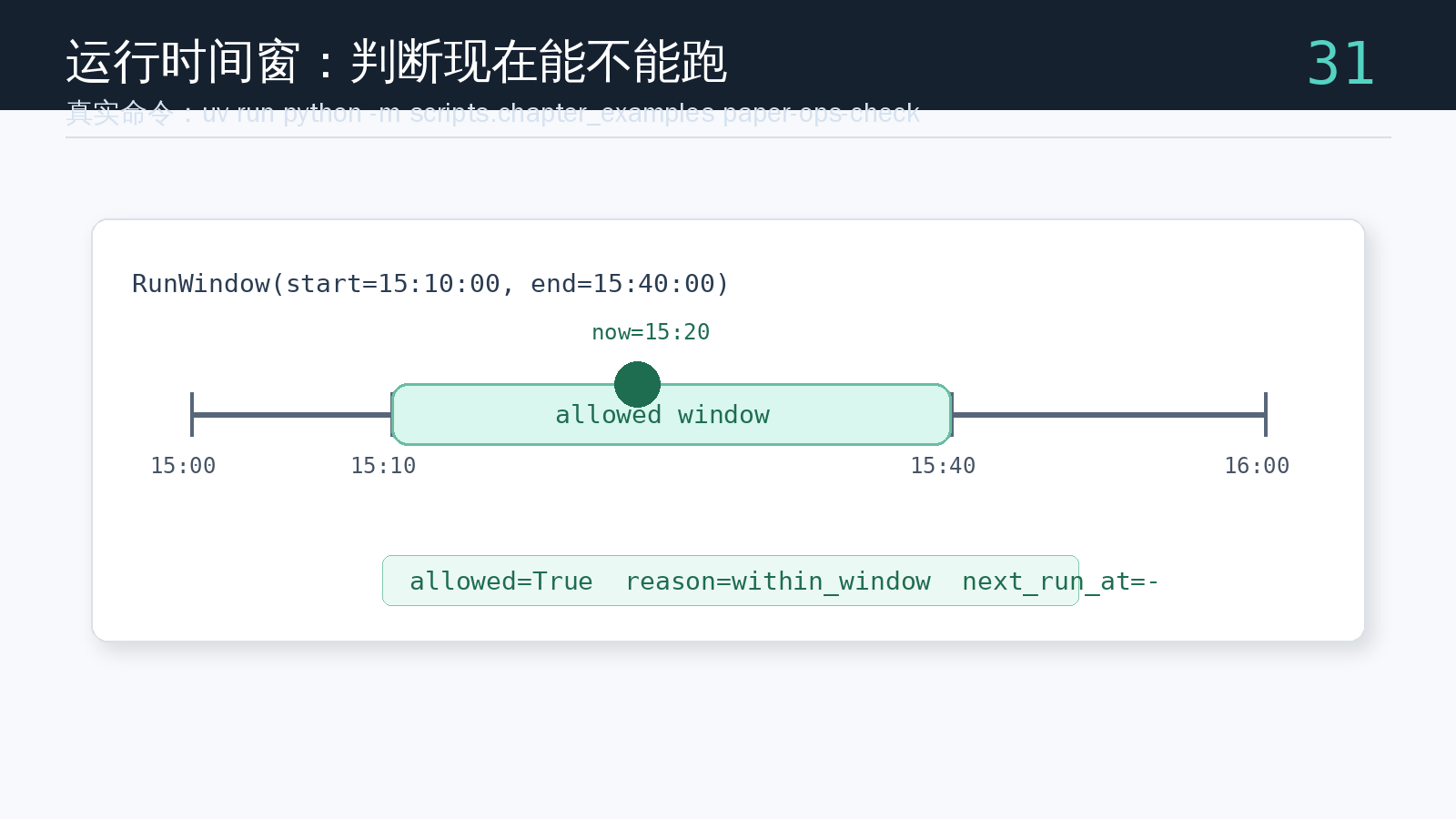
In this example, the current time is 15:20, and the allowed window is 15:10-15:40, so allowed=True. This is not strategy logic. It is run-admission logic: the system first confirms that this is a trustworthy time to run, then moves on to archiving and checks.
Test Coverage
The tests are small, but the boundaries must be explicit.
uv run pytest tests/test_run_window.pyThe tests cover three cases:
- Inside
15:10to15:40,15:20is allowed. - At
16:00, the current day’s window has already been missed, so the next run time is15:10on the following day. - For a midnight-crossing window from
23:00to01:00, both23:30and00:30are allowed, while02:00is not.
Chapter Update And Repository
This chapter adds:
app/run_window.py.RunWindowandRunWindowStatus.- Support for normal windows and midnight-crossing windows.
- The next allowed run time when the current time is outside the window.
- An integrated
paper-ops-checkexample showing how the run window enters the daily operations chain. tests/test_run_window.py, covering inside-window, outside-window, and midnight-crossing scenarios.
Repository:
https://github.com/ax2/zi-quant-platformCode for this chapter:
git clone https://github.com/ax2/zi-quant-platform.git
cd zi-quant-platform
git checkout chapter-31
uv sync --extra dev
uv run pytest tests/test_run_window.py
Chapter 31 is commit 4ce2ca8, tagged as chapter-31.
Summary
The run window is a small module, but it extracts “when the job may run” from the scheduler.
After article 31, the daily flow no longer only asks whether it can calculate. It first confirms whether the current moment is a trustworthy run time. The next article archives each daily run as a stable file, making later history summaries and investigations easier.
Follow ZiCode on WeChat
If this post was useful, you can follow later updates on WeChat as well.

X / Twitter
Follow @ax2_zicode
Faster technical notes, short thoughts, and new-post alerts are posted on X.

More in this column
- Quant Trading for Programmers 35: Generate An Operations Checklist
- Quant Trading for Programmers 34: Detect Market Data Gaps
- Quant Trading for Programmers 33: Summarize Paper-Trading Run History
- Quant Trading for Programmers 32: Archive Daily Run Results As JSON
- Quant Trading for Programmers 30: Generate A Daily Run Health Report
- Quant Trading for Programmers 29: Generate Target Weights From A Candidate List
- Quant Trading for Programmers 28: Abstract Price Inputs Into Price Providers
- Quant Trading for Programmers 27: Record Paper-Trading Daily Reports In Files