
Can Gemma 4 12B on Ollama Listen to Audio Directly?
In the previous article, I verified a question that is easy to confuse: can gemma4:12b on Ollama read an MP4 directly? The answer was no. The stable path is to extract frames first, then pass the frame sequence as image input.
This time the target is audio. The question looks simpler: ollama show gemma4:12b lists audio under capabilities. Does that mean we can send a voice clip directly to Ollama and ask the model to transcribe or understand it?
After testing, the answer still needs two layers:
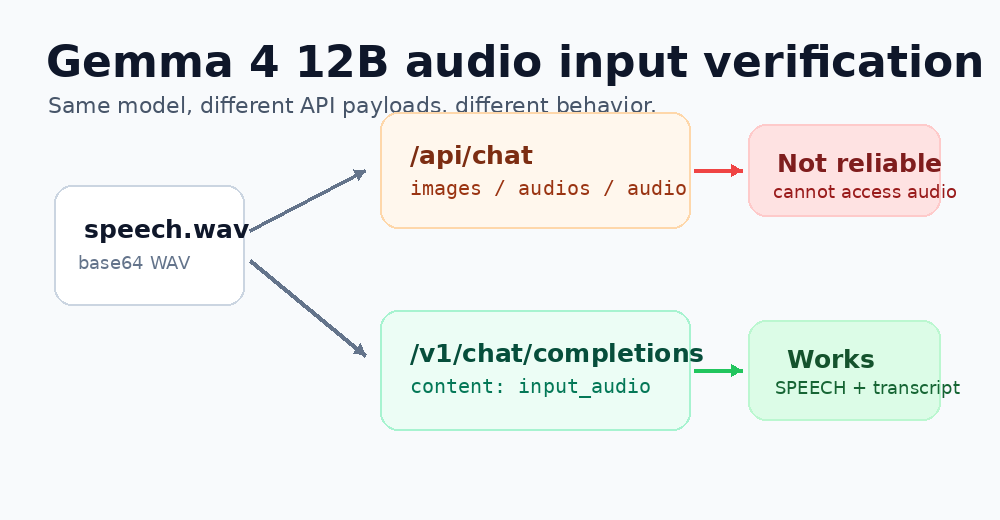
The model and local Ollama version declare audio support; but on the test machine, Ollama’s native /api/chat endpoint could not reliably accept audio. The path that actually worked was the OpenAI-compatible /v1/chat/completions endpoint with an input_audio content block.
This article records the full verification process. The point is not to prove that one model is “strong” or “weak.” The point is to clarify the boundary most likely to break during engineering integration: model capability, Ollama model metadata, and the exact API payload shape are three different things.
Test Environment
The test environment was a local test machine, with Ollama serving on the default port 11434.
$ ssh <test-machine> 'hostname; whoami; command -v ollama; ollama --version'
test-machine
alex
/usr/local/bin/ollama
ollama version is 0.30.5
The model had already been installed:
$ ollama list
NAME          ID              SIZE      MODIFIED
gemma4:12b    4eb23ef187e2    7.6 GB    10 days ago
The model metadata indeed says it has audio capability:
$ ollama show gemma4:12b
Model
  architecture        gemma4
  parameters          11.9B
  context length      262144
  embedding length    3840
  quantization        Q4_K_M
  requires            0.30.5

Capabilities
  completion
  vision
  audio
  tools
  thinking
This only proves that the model declares an audio capability. It does not prove that the API shape we use will work. So all later tests rely on endpoint responses and model behavior, not only metadata.
Round One: First Check Whether the Endpoint Accepts Audio
To exclude file-format surprises, I first generated two WAV files on the test machine using only Python’s standard library:
tone.wav: 1.2 seconds, 16 kHz, mono, 440 Hz sine wave.silence.wav: the same duration and sample rate, but pure silence.
The requests targeted two endpoints:
- Ollama native endpoint:
POST /api/chat - OpenAI-compatible endpoint:
POST /v1/chat/completions
The first native /api/chat attempt put base64 WAV data under messages[].images. The field name is clearly not ideal, but Ollama’s native multimodal API has long used images as the image entry point; when no clear native audio field was available, this was a necessary negative test.
import base64
import json
import urllib.request
from pathlib import Path

BASE = "http://127.0.0.1:11434"
MODEL = "gemma4:12b"
b64 = base64.b64encode(Path("/tmp/tone.wav").read_bytes()).decode()

payload = {
    "model": MODEL,
    "messages": [
        {
            "role": "user",
            "content": "Listen to this audio. Is it a steady tone or silence? Answer in one short English sentence.",
            "images": [b64],
        }
    ],
    "stream": False,
    "think": False,
    "options": {"temperature": 0, "num_predict": 80},
}

req = urllib.request.Request(
    BASE + "/api/chat",
    data=json.dumps(payload).encode(),
    headers={"Content-Type": "application/json"},
)

with urllib.request.urlopen(req, timeout=180) as r:
    print(r.read().decode())
The result was subtle:
native /api/chat tone status=200
It is a steady tone.

native /api/chat silence status=200
It is a steady tone.
If you only read the first line, it is easy to falsely conclude that audio worked. But the second, silent file was also answered as a steady tone. That makes this result untrustworthy. HTTP 200 only proves that the payload was not rejected outright. It does not prove that the model heard the audio.
The OpenAI-compatible endpoint has a clearer shape: use input_audio.
payload = {
    "model": "gemma4:12b",
    "messages": [
        {
            "role": "user",
            "content": [
                {
                    "type": "text",
                    "text": "Listen to this audio. Is it a steady tone or silence? Answer in one short English sentence.",
                },
                {
                    "type": "input_audio",
                    "input_audio": {
                        "data": b64,
                        "format": "wav",
                    },
                },
            ],
        }
    ],
    "stream": False,
    "temperature": 0,
    "max_tokens": 80,
    "reasoning_effort": "none",
}
For tone.wav, it returned:
openai /v1/chat/completions input_audio tone status=200
It is a steady tone.
This looked more promising than the native endpoint, but it was still not enough. The synthetic audio was too simple; the model might still be guessing from the prompt or file characteristics. So I continued with a stricter control.
Round Two: Fixed Labels to Avoid Being Fooled by Natural Language
In the second round, I forced the model to answer with one of four labels:
SILENCE, TONE, PULSE, CANNOT_ACCESS_AUDIOThe test samples included:
- A continuous sine wave.
- Silence.
- Intermittent pulses.
- No audio at all.
The results were:
native    tone     status=200    CANNOT_ACCESS_AUDIO
native    silence  status=200    CANNOT_ACCESS_AUDIO
native    pulse    status=200    CANNOT_ACCESS_AUDIO
native    none     status=200    CANNOT_ACCESS_AUDIO

openai    tone     status=200    PULSE
openai    silence  status=200    CANNOT_ACCESS_AUDIO
openai    pulse    status=200    CANNOT_ACCESS_AUDIO
openai    none     status=200    CANNOT_ACCESS_AUDIO
This result was more useful. It showed:
- Native
/api/chatbasically did not receive audio. - The OpenAI-compatible endpoint at least did not completely reject
input_audio, but recognition was unstable for short synthetic audio. - “HTTP 200 plus a plausible sentence” is not a valid audio-capability test.
At this point, I still could not say audio input was usable. I could only say: the native endpoint did not work; the OpenAI-compatible endpoint showed signs of working, but needed a real speech sample.
Round Three: Real English Speech WAV
The test machine did not have local speech or transcoding tools such as espeak, ffmpeg, festival, or pico2wave. It only had curl and wget:
espeak
espeak-ng
festival
pico2wave
say
ffmpeg
curl /usr/bin/curl
wget /usr/bin/wget
So I downloaded a public English WAV speech sample to /tmp/speech.wav and first asked the model whether it was human speech:
curl -L --fail --max-time 30 \
  -o /tmp/speech.wav \
  https://www.voiptroubleshooter.com/open_speech/american/OSR_us_000_0010_8k.wav
Then I called both endpoints with the same file.
Native /api/chat, still using images to carry the base64 WAV:
native status 200
CANNOT_ACCESS_AUDIO
OpenAI-compatible /v1/chat/completions, using input_audio:
openai status 200
SPEECH
This proved that the OpenAI-compatible audio path was not merely decorative. To further confirm that the model was not guessing from the WAV header or prompt, I asked it to transcribe the beginning.
The request still used the same input_audio format. Only the prompt changed:
Transcribe the first sentence or first 10 words of this audio. If you cannot access audio, say CANNOT_ACCESS_AUDIO.The returned text was:
The birch canoes slid on the smooth planks. Glue the sheet to the dark blue background. It is easy to tell the depth of a well. These days a chicken leg is a rare dish. Rice is often served in round bowls. The juice of lemons makes fine punch. The box was thrown beside the park truck. The hogs were fed chopped corn and garbage. Four hours of steady work faced usThe content matches the style of common English speech-test corpora, and it was not provided in the prompt. At this point, it is reasonable to conclude: on this test machine, gemma4:12b can process real speech input through the OpenAI-compatible endpoint.
Round Four: Excluding Other Native Audio Fields
Finally, I tried two field names that looked more like audio fields:
messages[].audiosmessages[].audio
The payload shape was roughly:
msg = {
    "role": "user",
    "content": "Transcribe the first sentence or first 10 words of this audio. If you cannot access audio, say CANNOT_ACCESS_AUDIO.",
    "audios": [b64],
}
The results were still negative:
FIELD audios STATUS 200
I am unable to transcribe the audio because I do not have access to any audio file or input in your message.

FIELD audio STATUS 200
I'm sorry, but I don't have access to an audio file to transcribe.
This means that with the tested combination of Ollama 0.30.5 and gemma4:12b, we should not expect native /api/chat to automatically recognize these audio fields. Based on this test, the stable path is only the OpenAI-compatible endpoint.
The Working Request Shape
For later code integration, I would fix the request in the following shape:
import base64
import json
import urllib.request
from pathlib import Path

base_url = "http://<test-machine>:11434"
model = "gemma4:12b"
audio_b64 = base64.b64encode(Path("speech.wav").read_bytes()).decode()

payload = {
    "model": model,
    "messages": [
        {
            "role": "user",
            "content": [
                {
                    "type": "text",
                    "text": "Transcribe this audio. If you cannot access audio, say CANNOT_ACCESS_AUDIO.",
                },
                {
                    "type": "input_audio",
                    "input_audio": {
                        "data": audio_b64,
                        "format": "wav",
                    },
                },
            ],
        }
    ],
    "stream": False,
    "temperature": 0,
    "max_tokens": 200,
    "reasoning_effort": "none",
}

req = urllib.request.Request(
    base_url + "/v1/chat/completions",
    data=json.dumps(payload).encode(),
    headers={"Content-Type": "application/json"},
)

with urllib.request.urlopen(req, timeout=240) as r:
    print(r.read().decode())
The response uses the OpenAI-compatible format:
{
  "id": "chatcmpl-529",
  "object": "chat.completion",
  "model": "gemma4:12b",
  "choices": [
    {
      "message": {
        "role": "assistant",
        "content": "The birch canoes slid on the smooth planks..."
      },
      "finish_reason": "length"
    }
  ]
}
Lessons From This Test
First, do not treat the capability list from ollama show as the final API contract. It is useful because it tells you what the model broadly supports; but for integration work, you still need to verify the exact API fields and payload shape.
Second, multimodal-input tests need negative controls. The first tone.wav result was dangerous precisely because it returned a plausible “It is a steady tone.” Without immediately testing silence.wav, it would have been easy to reach the wrong conclusion.
Third, for speech input, “can identify SPEECH” is not enough. A transcription or content-understanding test is better, because it confirms that the model read something from the audio.
Fourth, the native endpoint and the OpenAI-compatible endpoint should not be mixed up. The practical conclusion of this test is not “gemma4:12b can hear audio through Ollama no matter how you send it.” It is more specific:
On the tested Ollama 0.30.5 setup, gemma4:12b can accept WAV speech input through /v1/chat/completions with input_audio; native /api/chat with images, audios, or audio should not be treated as a reliable path.
That sentence looks a little verbose, but engineering conclusions should be written this way. Missing one condition can easily cost an extra hour of debugging later.
Follow ZiCode on WeChat
If this post was useful, you can follow later updates on WeChat as well.

X / Twitter
Follow @ax2_zicode
Faster technical notes, short thoughts, and new-post alerts are posted on X.
